
The best cold wallets
Some links on this page are affiliate links. If you buy through them, we may earn a commission at no extra cost to you. It never changes what we recommend. How we make money
Short answer
The best cold wallet for most people is the Trezor Safe 5 ($129): a certified secure chip, published code and a touchscreen to check every payment on.
- On a phone, without a cable: Ledger Nano Gen5 ($179).
- On a budget: Trezor Safe 3 ($59).
- Bitcoin only: BitBox02 Nova (€175).
- No recovery words to write down: Tangem ($54.90 for two cards).
This page is researched from the makers' own shop and specification pages (read on 15 and 16 November 2026), published security research and each company's incident record in 2025 and 2026. We haven't tested the devices hands-on. We may earn a commission from Trezor, Ledger, BitBox and Tangem if you buy through our links; that doesn't change the order, which comes from the six points under How we ranked them.
What a cold wallet is, in one minute
A cold wallet is a small device that holds the private keys to your crypto and never hands them to an internet-connected computer. Your coins are recorded on the blockchain; the keys are what let you move them. "Cold storage" means keeping those keys offline, and for most people that means a hardware wallet like the ones below.
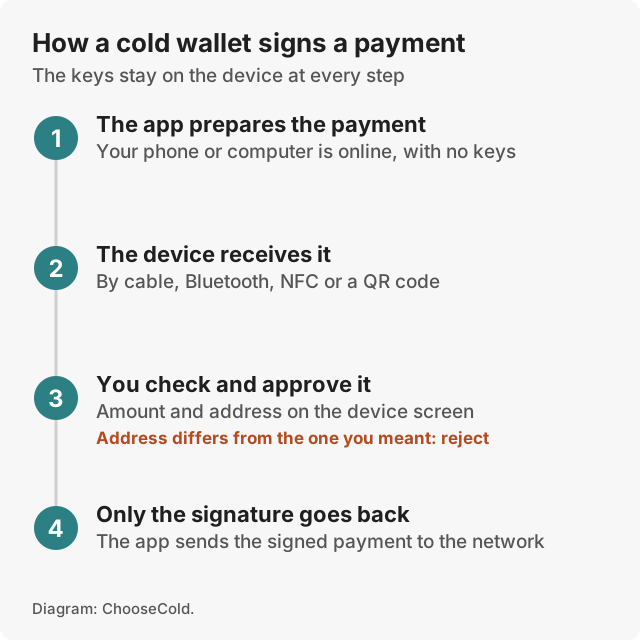
To send coins, your phone or computer prepares the payment and passes it to the device. You check the amount and the address on the device's own screen and approve it there. The device signs it inside its chip and passes back only the signature. Malware on your computer can see the payment, but it can't take the keys.
If you are still deciding whether you need one, our hot wallet vs cold wallet guide compares the two. The short version: money you would hate to lose belongs in cold storage.
The best cold wallets compared
| Cold wallet | Best for | Screen | Connects by | Price |
|---|---|---|---|---|
| Trezor Safe 5 | Most people | 1.54" colour touchscreen | USB-C | $129 |
| Ledger Nano Gen5 | Phones | 2.8" E Ink touchscreen | USB-C, Bluetooth, NFC | $179 |
| Trezor Safe 3 | A tight budget | 0.96" mono, two buttons | USB-C | $59 |
| Trezor Safe 7 | iPhone users | 2.5" colour touchscreen | USB-C, Bluetooth | $249 |
| BitBox02 Nova | Bitcoin only | Built-in screen | Bluetooth (can be off) | €175* |
| Tangem Wallet | No words to write down | None | NFC | $54.90 |
* BitBox lists €145.83 before VAT; €175 includes 20% VAT. Other prices in US dollars from each maker's own shop on 15 and 16 November 2026, before shipping and tax.

Trezor Safe 5
Best cold wallet overall
$129Check price
The Safe 5 does the three things a cold wallet has to do, at a price most people can justify. Its 1.54-inch colour touchscreen shows long addresses clearly enough to check them. Its secure chip is certified EAL6+, a Common Criteria grade from an independent lab evaluation that includes resistance to physical attack. And Trezor publishes its device code, so outside researchers can check it.
The backup options are the widest here: 12, 20 or 24 recovery words, a multi-share backup that splits the words across several cards so one stolen card isn't the whole key, and an optional passphrase. It connects by USB-C only.
Pros
- Colour touchscreen at a mid price
- Certified chip and published device code
- Multi-share backup and passphrase
Cons
- Can't send or be set up from an iPhone
- Partner leaks exposed Trezor customers' contact details in 2026
In 2026 Trezor's shipping provider leaked the contact details of 80,689 customers, and a breach at its email service led to phishing aimed at about 347,000 newsletter addresses (BleepingComputer). Safe 5s bought from CryptoBilis, a reseller in Southeast Asia, between 20 August and 23 September 2026 had an implant fitted inside. Trezor disclosed it in November 2026: 48 customers came forward, no funds were reported lost, and firmware 2.13.1 blocks the CryptoBilis implants. None of these broke the device design, but they are why you should buy from trezor.io and ignore any email about your wallet. Our Trezor review covers each incident.
Skip it if your only device is an iPhone; the Safe 7 or the Nano Gen5 suits you better.

Ledger Nano Gen5
Best cold wallet for phones
$179Check price
The Nano Gen5 is the cold wallet built to be used from a phone. It connects by Bluetooth or NFC as well as USB-C, runs up to about ten hours on a charge, and has a 2.8-inch E Ink touchscreen, the paper-like kind used in e-readers. Its secure chip is rated EAL6+, the same grade as Trezor's, and Ledger's app supports over 500 coins directly. A Ledger Recovery Key, an NFC card that stores a backup, comes in the box.
Pros
- Bluetooth and NFC for iPhone and Android
- Large touchscreen at a mid price
- Backup card included
Cons
- Device operating system only "partially reviewable", in Ledger's words
- The longest incident record of the picks
Ledger has the longest incident record of any maker here. A 2020 breach exposed about 272,000 customers' names and home addresses. A December 2023 attack on a Ledger software library drained roughly $600,000 from people using connected apps; the devices themselves were not breached (BleepingComputer). In January 2026 a payment partner exposed order details. Ledger also offers Recover, an optional paid service that splits an encrypted copy of your backup into three pieces held by Ledger and two outside companies, after an identity check. You don't have to use it, but some owners dislike that the firmware can export a backup at all.
Why not higher: device code that outsiders can't fully review, and the incident record. Skip it if you never use crypto from a phone; the Safe 5 is cheaper and more open.

Trezor Safe 3
Best cheap cold wallet
$59Check price
At $59 the Safe 3 is the cheapest cold wallet here with its own screen. It has the same certified EAL6+ chip, published code, coin support and backup options as the Safe 5. You give up the touchscreen: a 0.96-inch monochrome display and two buttons, so a long address is shown in parts.
In March 2025 Ledger's research lab showed an attack on the Safe 3's main processor that needs the device in hand and lab equipment. Trezor said a determined attacker could "theoretically" use it to take the keys from a stolen device (The Block). If that worries you, use a long PIN and a passphrase, and move your coins to a new wallet if the device is ever lost.
Pros
- Lowest price for a device with a screen
- Same chip grade and backup options as the Safe 5
Cons
- Small screen, two buttons
- Cable only; limited on an iPhone
Why not higher: the screen. If you will check long addresses or approve app transactions often, the Safe 5's touchscreen is worth the extra $70. Our Trezor Safe 3 review goes into whether it is enough.

Trezor Safe 7
Best cold wallet for iPhone
$249Check price
The Safe 7 is the only Trezor that does everything from an iPhone, because it is the only one with Bluetooth. It has a 2.5-inch colour touchscreen, a battery with Qi2 wireless charging, IP54 splash protection and two secure chips: the EAL6+ chip used across the range, plus TROPIC01, a chip whose design is published for outside audit.
Pros
- Full iPhone support from Trezor
- Largest Trezor screen
- Two secure chips, one of them auditable
Cons
- Nearly double the price of the Safe 5
- A battery that will age
Why not higher: the price. For a computer or an Android phone, the Safe 5 does the same job for $120 less. Our Trezor Safe 7 review covers the Bluetooth trade-off.

BitBox02 Nova
Best cold wallet for Bitcoin
€175Check price
BitBox, a Swiss maker, sells the Nova in two editions at the same price that can't be converted later: Multi, which adds a selection of other coins, and Bitcoin-only. For someone who holds only Bitcoin, the Bitcoin-only edition is the reason to buy it: less code on the device means fewer places for a bug.
It has an EAL6+ rated chip, a screen of its own and encrypted Bluetooth that you can switch off. The backup can go onto a microSD card. In August 2026 BitBox fixed two firmware flaws in version 9.26.5 (Cointelegraph); update before you load any coins.
Pros
- A true Bitcoin-only edition
- microSD backup option
Cons
- Priced in euros; check delivery to your country
- Edition can't be changed after you buy
Why not higher: the price, the euro-only shop and a smaller coin range in the Multi edition. Skip the Bitcoin-only edition if you hold anything else.

Tangem Wallet
Best cold wallet without recovery words
From $54.90Check price
Tangem is a set of two or three NFC cards. You tap one against your phone over NFC to approve a payment. The same wallet is copied to every card at setup, so a spare card is the backup, and you don't have to write down recovery words unless you choose to. Two cards cost $54.90 and three $69.90. There is no battery, and Tangem rates the cards IP69K against water and dust.
The trade-off is that there is no screen. You approve what your phone shows, so a compromised phone could show one address while you sign another. In July 2026 Ledger's lab also showed a laser attack that resets a card's password; it needs the card itself and about $250,000 of lab equipment, and Tangem says the real-world risk is "virtually non-existent" (The Block).
Pros
- No words to write down or lose
- Lowest entry price here
- No battery to charge
Cons
- No screen to check what you sign
- Works only through a phone
Why not higher: the missing screen, which counts for more as the amount grows. Our Tangem review covers it in detail.
How we ranked them
- The keys stay with you. Every pick is non-custodial: the device holds the keys, and no company does.
- A screen of its own. A cold wallet that shows you what you sign protects you from a compromised phone or computer. This is why Tangem ranks last.
- Chip and code. A certified secure chip resists physical attack; published code lets outsiders check it. Trezor has both. Ledger publishes its Ledger Wallet app code and calls its device operating system "partially reviewable": its agreement with the chip maker stops it publishing the low-level code for the secure chip (Ledger).
- Track record. We read every published incident for each maker in 2025 and 2026, and weighed what each one put at risk: keys, devices or contact details.
- Price. A cold wallet you can afford beats a better one you don't buy.
- Ease of use. Phone support, screen size and how the backup works.
Which cold wallet fits you
| If you… | Buy |
|---|---|
| want one good default | Trezor Safe 5, $129 |
| use an iPhone and want Trezor | Trezor Safe 7, $249 |
| use a phone and want to spend less | Ledger Nano Gen5, $179, or the Nano X, $99 |
| are spending as little as possible | Trezor Safe 3, $59 |
| hold only Bitcoin | BitBox02 Nova, Bitcoin-only edition |
| would lose a sheet of words | Tangem, three cards, $69.90 |
| See Trezor |
The Ledger Nano X ($99) didn't make the list because its chip is rated EAL5+, a grade below every pick here, and its screen is small. It is still the cheapest way to get Bluetooth from a major maker. For more models, including the Ledger Stax and Flex, see our best hardware wallets list.
Best cold wallet for XRP and USDT
Two coins come up again and again in searches for a cold wallet.
XRP: Trezor lists XRP as supported on the Safe 3, Safe 5 and Safe 7. Ledger says its hardware wallets can "securely store XRP", and Tangem lists the XRP Ledger among its networks. We couldn't confirm XRP on the BitBox02 Nova, so check BitBox's coin list before buying one for it.
USDT (Tether): USDT is a token that runs on several blockchains, Ethereum and Tron among them. A cold wallet that supports a given network can hold USDT on that network, but you have to send it on the same network you receive on. Before you move a large amount, send a small test payment and check it arrives.
Setting up cold storage safely
- Buy from the maker's own shop or a reseller it lists (Trezor also runs official Amazon stores). Never second hand, never from an auction, never from an unknown seller with a discount.
- Check the packaging seal and, for Trezor, that the device arrives with no firmware installed.
- Install the maker's app from its own website. Never use a link from a search ad.
- Create a new wallet on the device. If recovery words come printed in the box, someone else knows them: don't use it.
- Write the words on paper or steel, in order. Don't photograph them or type them into anything.
- Set a PIN, and consider a passphrase you store separately.
- Send a small test amount first, and check the receive address on the device screen.
- Store the backup somewhere other than the device, safe from fire and water.
What a cold wallet doesn't protect you from
A cold wallet protects the keys. It can't stop you giving them away or approving the wrong payment, and that is where most losses happen:
- Typing your recovery words anywhere. No genuine app, site or support agent ever asks for them.
- Fake emails. After Trezor's 2026 data leaks, owners received convincing fake security alerts. Ignore any message asking you to "verify" your wallet.
- Approving without reading. If the address on the device doesn't match, reject the payment.
- Losing both the device and the backup. A device can be replaced; lost words can't.
- A tampered device. The 2026 CryptoBilis case showed a device from the wrong seller can be compromised before you open it.
A cold wallet also doesn't hide anything from the tax office. Moving coins to one changes who holds the keys. It doesn't change what you owe.
What we left out, and why
- Coldcard: a weak random number generator in its firmware since 2021 left recovery words guessable, and TRM Labs estimates about $116 million in Bitcoin was taken from affected wallets in 2026 (TRM Labs). Coinkite has fixed it in new firmware, but an update doesn't repair words already created.
- Keystone 3 Pro: an air-gapped wallet that signs through QR codes. We couldn't confirm a standalone price from its shop, so we can't rank it fairly yet.
- Ledger Stax and Flex: good devices, but more expensive than the Nano Gen5 for the same chip and connections. They are in our hardware wallets list and our Ledger Stax review.
Questions people ask
What is the most trusted cold wallet?
Trezor and Ledger are the two best-known makers, and both have certified secure chips on their current devices. Trezor publishes its device code. Ledger publishes its Ledger Wallet app code and calls its device operating system "partially reviewable". Both have had customer contact details leaked through partners. We rank the Trezor Safe 5 first for most people.
Can the IRS see your crypto wallet?
The IRS can't see inside a cold wallet, but transactions on public blockchains are visible to anyone, and US digital asset brokers report customers' sales to the IRS on Form 1099-DA (IRS). Moving coins to a cold wallet doesn't change what you owe. Keep records of every buy and sale; a tracker such as CoinTracking turns them into a tax report.
Are cold wallets 100% safe?
No. A cold wallet keeps the keys away from malware, but you can still lose coins by typing your recovery words into a fake site, approving a payment you didn't read, losing both the device and the backup, or buying a tampered device. Used carefully, it is the safest way most people can hold crypto themselves.
Which cold wallet holds XRP?
Trezor's Safe 3, Safe 5 and Safe 7, Ledger's hardware wallets and Tangem all support XRP. Check the maker's coin list for any less common token before you buy.
Is a hardware wallet the same as a cold wallet?
Nearly always, yes. A cold wallet is any wallet whose keys stay offline; a hardware wallet is the most common kind. A paper wallet, recovery words written down with no device, is also cold, but it is harder to use safely.
Can I lose my crypto if my cold wallet breaks?
Not if you have the backup. The coins are on the blockchain, and your recovery words (or Tangem's backup cards) restore them on a new device. Lose both the device and the backup and the coins are gone for good.