
Ledger Nano X review: still worth buying?
Some links on this page are affiliate links. If you buy through them, we may earn a commission at no extra cost to you. It never changes what we recommend. How we make money
Short answer
The Ledger Nano X is still a safe hardware wallet, and at $99 it is the cheapest way to use a Ledger from an iPhone without a cable. It is also Ledger's oldest design: a small two-button screen, an EAL5+ chip one grade below the rest of the range, and a battery owners say wears out. Buy the Nano S Plus ($69) if you never use an iPhone, or the Nano Gen5 ($179) if you can stretch to it.
How we reviewed it: from Ledger's product, comparison, support and Academy pages (read on 15 and 16 November 2026), Ledger's shop reviews, owner threads on r/ledgerwallet, published reviews, and the reporting on Ledger's incidents. We haven't tested the Nano X hands-on. We may earn a commission if you buy through our links; that doesn't change the rating. The 7.2 rating weighs security design, ease of use, price and Ledger's record (see how we rate). It loses most for the EAL5+ chip, the small screen and owner reports of battery wear.
Pros
- Bluetooth and full iPhone support for $99
- Room for up to 100 apps at once
- 500+ coins in Ledger Wallet, more through other apps
- Small and light: 35.8 g
- 4.4 from 11,613 shop reviews
- Works with Ledger Recover, if you want a paid backup
Cons
- EAL5+ chip, below the EAL6+ of every other current Ledger
- 1.1-inch screen and two buttons make long addresses slow to check
- Battery rated at about 5 hours; owners report wear
- No NFC, so no Ledger Recovery Key card
- Ledger doesn't publish the low-level code that talks to the secure chip
What the Ledger Nano X is
The Nano X is a USB stick-shaped hardware wallet with a small monochrome screen and two buttons. It keeps your private keys on a secure chip, offline, and shows each payment on its own screen so you can check it before you approve. You manage coins in the Ledger Wallet app (formerly Ledger Live) on a computer or phone, by USB-C cable or Bluetooth.
Ledger introduced the Nano X in January 2019 and published a security model for the wireless link at the same time. For years the Nano X was Ledger's main Bluetooth model. Since the Nano Gen5 arrived in October 2025 with a touchscreen, NFC and an EAL6+ chip, the Nano X has become the budget Bluetooth option, now at $99. Ledger's own buying guide calls it a "long-established mobile-first signer" and suggests it for Bluetooth use on the go or as a second device.
Ledger Nano X specifications
| Price | $99 (shop.ledger.com, 15 and 16 November 2026) |
| Screen | 1.1" monochrome OLED, 128 x 64 pixels, two buttons |
| Secure chip | ST33J2M0, Common Criteria EAL5+ |
| Connections | USB-C, Bluetooth 5.2; no NFC |
| Battery | "5 hour battery autonomy" (Ledger) |
| Apps | Up to 100 installed at once |
| Coins | 500+ in Ledger Wallet; thousands more through third-party wallets (Ledger) |
| Phones | iOS 14+ and Android 10+ |
| Computers | Windows 10/11 (64-bit), macOS, Ubuntu LTS; not Chromebooks |
| Size and weight | 72 x 18.6 x 11.7 mm; 35.8 g |
| Body | Steel and plastic |
| In the box | USB-C to USB-A cable, three recovery sheets, strap |
Nano X vs Nano S Plus vs Nano Gen5
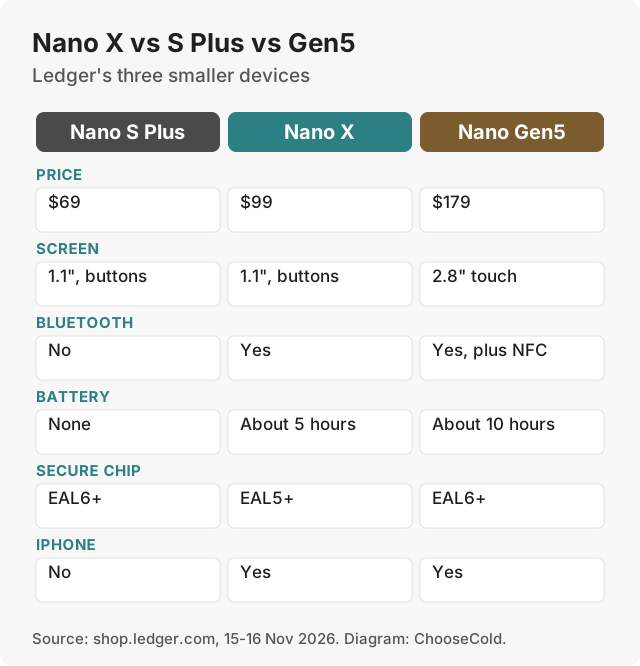
| Nano S Plus | Nano X | Nano Gen5 | |
|---|---|---|---|
| Price | $69 | $99 | $179 |
| Screen | 1.1", buttons | 1.1", buttons | 2.8" E Ink touch |
| Bluetooth | No | Yes | Yes |
| NFC | No | No | Yes |
| Battery | None | About 5 hours | About 10 hours |
| Secure chip | EAL6+ | EAL5+ | EAL6+ |
| iPhone | No | Yes | Yes |
| Recovery Key card | No | No | Yes |
| Compare at Ledger | |||
Prices in US dollars from shop.ledger.com on 15 and 16 November 2026, before shipping and tax.
The top answer in an r/ledgerwallet thread on whether the Nano X is still worth it sums up the choice: the Nano S Plus is a Nano X without Bluetooth and a battery. If you use a computer or an Android phone with a cable, the S Plus does the same job for $30 less and has the higher-grade chip. The Nano X earns its extra $30 only if you need Bluetooth, which in practice means an iPhone.
The Gen5 is the better device in almost every way: a 2.8-inch touchscreen, NFC, twice the battery and an EAL6+ chip. It costs $80 more. Another r/ledgerwallet thread of Nano X owners asking "would you buy it again?" drew the reply "Nano S Plus or Nano Gen 5", alongside complaints about the battery and buttons.
Which small Ledger should you buy?
Choose the Nano S Plus ($69) if
You use a computer, or an Android phone with a cable, and want the cheapest Ledger. Ledger calls it "a wired-only signer suited to simple, low-cost cold storage". It has no battery, so nothing wears out, and its chip is EAL6+. It doesn't work with an iPhone.
Choose the Nano X ($99) if
You want to sign from an iPhone, or from any phone without a cable, and $99 is your limit. You accept a small screen, two buttons, an EAL5+ chip and a battery that may fade.
Choose the Nano Gen5 ($179) if
You can spend $80 more. Ledger groups the Gen5 with its "next-generation" devices: a touchscreen driven by the secure chip, Transaction Check and a Recovery Key card in the box. Ledger's guide says the Nano X has none of the three, and that the small screens on its older models make complex transactions harder to review.
Security
The Nano X keeps your keys on the ST33J2M0 secure chip, certified EAL5+. EAL is a grade from an independent lab's evaluation, and the Nano X's chip is one grade below the EAL6+ chips in the Nano S Plus, Gen5, Flex and Stax and in Trezor's current models. The higher grade means the chip was evaluated against stronger attacks by someone with the device in hand. We found no published attack that takes keys from a Nano X in normal use.
Ledger publishes its Ledger Wallet app code, which it says is "completely open source under an MIT license", along with its Wallet API, its Secure SDK crypto library and the coin apps that run on the device. It calls its device operating system "partially reviewable": its agreement with chip maker STMicroelectronics stops it publishing the low-level code that talks to the secure chip. For that part, you trust Ledger and the certification lab, which is the main difference from Trezor, whose firmware is published in full.
How the Nano X uses Bluetooth
Ledger published the Nano X's Bluetooth security model when the device launched in 2019. It says "only public data is transported by Bluetooth": the payment going to the device and the signature coming back. The private keys and recovery words stay on the chip. The link is encrypted with AES. When you pair, the Nano X and your phone each show a number, and you check that they match. Ledger notes that some older Android versions can't do this number check; the device warns you, and a nearby attacker could in theory sit in the middle of the link. Even then, you confirm every transaction on the Nano X, and Ledger says "No transaction signature is issued without your explicit consent."
If you'd rather not use Bluetooth, you can switch it off and use the USB-C cable. Device updates over Bluetooth need Ledger OS 2.4.1 or later.
Ledger's incident record
- 2020: a leak of Ledger's customer data took about a million email addresses. A database of about 272,000 customers, with names, home addresses and phone numbers, was later posted on a hacking forum. Ledger's CEO wrote to customers about it on 21 December 2020. No funds were taken through the leak itself. Phishing emails to those customers followed.
- December 2023: an attacker phished the account of a former Ledger employee and pushed malicious versions of the Connect Kit software library. They were live for about five hours and drained roughly $600,000 from people using connected apps. Ledger devices and Ledger Live were not affected (BleepingComputer).
- January 2026: payment partner Global-e exposed customers' order details, with no wallet or card data (The Block).
None of these broke a Ledger device. The danger to owners was phishing that used the leaked details to ask for recovery words.
Backup options on the Nano X
- Paper recovery sheets. Three come in the box. You write your 24 recovery words on one. Ledger includes them with every device.
- No Recovery Key card. Ledger's NFC backup card works with its touchscreen models. The Nano X has no NFC, so it can't use one.
- Ledger Recover. An optional subscription run with Coincover, at $9.99 a month with the first month free, according to Ledger. Ledger's Recover page lists the Nano X as supported in Ledger Wallet on desktop and mobile (the Nano S Plus works with it on desktop only). Your encrypted backup is split into three pieces held by Coincover, Ledger and EscrowTech, and any two restore it. You need a passport or national ID to sign up, or a driver's licence in the US and Canada.
- Metal plates. Ledger's shop also sells metal backup plates (Billfodl, Cryptotag Zeus) as an alternative to paper.
Ledger Recover drew strong criticism when it was announced in May 2023, because it showed the device could export its backup (The Block). Ledger said it is opt-in and nothing changes for people who don't sign up.
Passphrase and hidden accounts
Ledger says "All Ledger hardware devices have the passphrase option available". A passphrase is an extra word of your choosing, up to 100 characters, added to your 24 words. Each passphrase opens a separate set of accounts. You can type it each time (the device forgets it when it turns off) or link it to a second PIN. Entering 100 characters with two buttons is slow, so a short, strong passphrase or the second-PIN option suits the Nano X better. If you forget the passphrase, those accounts are gone.
Battery and screen
Ledger rates the battery at about five hours of use. It is there for Bluetooth. Owner complaints about it come up often: in one r/ledgerwallet thread, a Nano X owner reported battery trouble within months. Google's AI overview for "ledger nano x review" also lists battery lifespan as a main drawback. A worn battery doesn't put your coins at risk, because they live on the blockchain and your recovery words restore them. It makes Bluetooth use less convenient.
The 1.1-inch screen shows 128 by 64 pixels. A long address scrolls across it in pieces, and you press both buttons to approve. It works, but checking every character takes patience, and on a hardware wallet checking the address is the point.
Setting up the Nano X
- Install Ledger Wallet from ledger.com or your phone's official app store. It runs on Windows, macOS, Linux, iOS and Android. On a computer, Ledger lists Windows 10 or 11 (64-bit), macOS and Ubuntu LTS, and says the Nano X doesn't work with Chromebooks.
- Turn on the Nano X and set it up as a new device. On a phone, pair it over Bluetooth and check that the number on both screens matches. On a computer, use the cable.
- Choose a PIN of 4 to 8 digits. After three wrong attempts the device resets itself, and only your recovery words bring the accounts back.
- Write down the 24 recovery words on one of the three recovery sheets in the box. Keep the sheet offline and never photograph it.
- Let Ledger Wallet run its genuine check. Ledger says it runs when you first connect, each time you open Ledger Wallet, when you install an app and when you update the device.
- Install apps for the coins you hold (up to 100 fit), add accounts, and send a small amount first.
The Ledger Wallet app
Ledger Wallet is the free app you use with the Nano X. Ledger says it manages "15,000+ crypto" across more than 100 blockchains, with 500+ coins supported directly and thousands more through third-party wallets. Ledger lists these features:
- Buy, sell and swap through third-party providers. The app compares quotes from 50+ of them, and each charges its own fee.
- Staking for ETH, SOL and some stablecoins.
- Clear Signing, which shows transaction details on the device.
- Direct connection to apps (dApps) and NFTs on supported networks.
On the Nano X's small screen, Clear Signing details take several screens to read.
What owners and reviewers say
- Ledger's shop: 4.4 out of 5 from 11,613 reviews on 16 November 2026.
- r/ledgerwallet, "Is the Nano X still worth it?": the top reply says the Nano S Plus is a Nano X without Bluetooth and a battery.
- r/ledgerwallet, "Nano X owners would you buy it again?": complaints about the battery and buttons, and a suggestion to buy the Nano S Plus or Nano Gen5.
- WIRED reviewed it in 2022, when it sold for $149. It now costs $99 at Ledger and at Best Buy.
- Google's AI overview lists the battery lifespan and the dated two-button design as the main drawbacks.
Nano X vs Trezor on an iPhone
The Nano X's main selling point is iPhone use, so it is worth knowing what Trezor offers there. Trezor's Safe 3 ($59) and Safe 5 ($129) connect by USB-C only and have no Bluetooth. On iOS, Trezor says they can check balances, buy and receive, with "No swap, send, setup or device management on iOS". On a computer or Android phone, both work fully.
Trezor's only model with full iPhone use is the Safe 7 at $249. It adds Bluetooth, a 2.5-inch colour screen and Qi2 wireless charging. That is $150 more than the Nano X and $70 more than the Ledger Nano Gen5.
So for an iPhone owner with $99, the Nano X is the only device here that can send from the phone. If you mostly sign from a computer, the Trezor Safe 5 remains our overall pick: it has a colour touchscreen, an EAL6+ chip and published firmware for $129. If you want full iPhone use and a touchscreen, compare the Nano Gen5 at $179 with the Safe 7 at $249.
What the Nano X doesn't protect you from
- Typing your 24 recovery words into anything. No real Ledger app, site or support agent asks for them.
- Approving without reading the address on the small screen.
- Losing both the device and the backup sheet.
- A tampered device bought second hand or from an unofficial seller.
- Phishing that uses leaked contact details, as after Ledger's 2020 leak.
- Theft under threat. A passphrase can hide a second set of accounts, and Ledger says that kind of protection "has a limit".
Is my Ledger Nano X genuine?
- Buy from shop.ledger.com or an official Ledger store, never second hand.
- Set it up as a new device and write down the 24 words it shows you. If a sheet in the box already has words printed on it, don't use the device.
- Connect it to Ledger Wallet. The chip inside signs a challenge from Ledger's servers with a key Ledger put there, and Ledger Wallet blocks the connection if the check fails.
- Send a small test amount before your savings.
What if you lose the Nano X, or Ledger goes out of business?
Your coins live on the blockchain. The Nano X holds the keys, and your 24 words are a copy of them. If the device is lost or the battery dies for good, restore the words on another Ledger. Ledger says that if it "didn't exist anymore, your cryptocurrency coins and keys would be safe". The 24 words follow the BIP39 standard, which many other wallets read, so you could restore them elsewhere. If you added a passphrase, you need that too.
Ledger Nano X alternatives
| Alternative | Price | Why choose it |
|---|---|---|
| Ledger Nano S Plus | $69 | Same screen, EAL6+ chip, no Bluetooth; computer and Android only |
| Ledger Nano Gen5 | $179 | Touchscreen, NFC, EAL6+, twice the battery |
| Trezor Safe 3 | $59 | Cheapest with a screen, published code; limited on iPhone |
| Trezor Safe 5 | $129 | Our overall pick, touchscreen, published code |
| See Trezor | ||
For the full field, see our best hardware wallets, Trezor vs Ledger and Ledger Stax review.
Is the Ledger Nano X worth it in 2026?
At $99, yes, for one buyer: someone on an iPhone who wants a Ledger and won't spend $179. Everyone else has a better option. On a computer or Android, the Nano S Plus costs less and has the better chip. With $80 more, the Gen5 is a clear upgrade in screen, chip and battery.
Questions people ask
Is the Ledger Nano X still safe?
Yes. We found no published attack that takes keys from a Nano X in normal use. Its EAL5+ chip is one grade below Ledger's newer devices. Ledger's incidents were customer data leaks and an attack on a software library. None of them broke a Ledger device.
What is the difference between the Ledger Nano X and Nano S Plus?
The Nano X adds Bluetooth and a battery, which make it work with an iPhone, for $30 more. The Nano S Plus has the higher EAL6+ chip grade and no battery to wear out.
Is the Ledger Nano X or Nano Gen5 better?
The Gen5: a 2.8-inch touchscreen, NFC, an EAL6+ chip and about ten hours of battery, for $179 against $99.
How long does the Ledger Nano X battery last?
Ledger quotes about five hours of use per charge. Owners complain about battery wear, in one thread within months.
Does the Ledger Nano X work with an iPhone?
Yes, through Ledger Wallet over Bluetooth, on iOS 14 or later.
Does Ledger Recover work with the Nano X?
Yes. Ledger lists the Nano X as supported in Ledger Wallet on desktop and mobile. It costs $9.99 a month after a free first month and needs an ID check.
Can the Ledger Nano X store XRP?
Yes. Ledger says its hardware wallets can store XRP, and the Nano X runs the same Ledger Wallet apps.