
Trezor vs Ledger: which should you buy?
Some links on this page are affiliate links. If you buy through them, we may earn a commission at no extra cost to you. It never changes what we recommend. How we make money
Short answer
Pick Trezor if you want published device code, the cheapest hardware wallet with a screen ($59) or a Bitcoin-only edition, and you manage crypto from a computer or an Android phone.
Pick Ledger if you mostly use an iPhone and don't want to spend $249, or you want a big E Ink touchscreen with Bluetooth for $179.
For most people the best single device is the Trezor Safe 5 ($129). For phone users it is the Ledger Nano Gen5 ($179).
This comparison uses Trezor's and Ledger's own shop, comparison and support pages (read on 15 and 16 November 2026), published security research and the reporting on each maker's incidents. We haven't tested the devices hands-on. We may earn a commission from both makers if you buy through our links, so the commission doesn't push the choice one way.
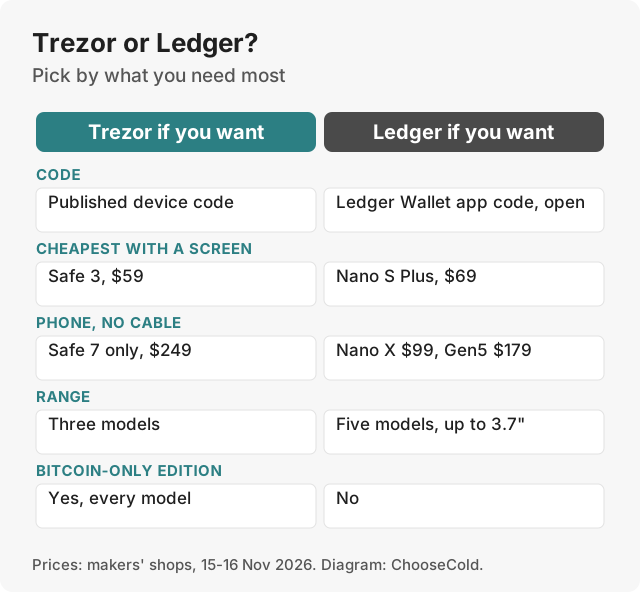
Trezor vs Ledger at a glance
| Trezor | Ledger | |
|---|---|---|
| Models on sale | Safe 3, Safe 5, Safe 7 | Nano S Plus, Nano X, Nano Gen5, Flex, Stax |
| Price range | $59 to $249 | $69 to $399 |
| Secure chip | EAL6+ on all three | EAL6+ on four; EAL5+ on the Nano X |
| Device code | Published | Ledger Wallet app published; device operating system "partially reviewable" (Ledger) |
| Bluetooth | Safe 7 only | Nano X, Gen5, Flex, Stax |
| Full iPhone use | Safe 7 only | Every model except the Nano S Plus |
| Touchscreen | Safe 5, Safe 7 | Gen5, Flex, Stax |
| Backup | 12, 20 or 24 words, multi-share, passphrase | 24 words, passphrase, optional paid Ledger Recover |
| Bitcoin-only edition | Yes, every model, same price | None listed in Ledger's shop |
| Coins | "1000s of coins & tokens" | 500+ in Ledger's app, more through other apps |
| App | Trezor Suite | Ledger Wallet (formerly Ledger Live) |
| See Trezor | See Ledger |
Prices in US dollars from trezor.io and shop.ledger.com on 15 and 16 November 2026, before shipping and tax.
Security: open code or a closed secure chip
This is the real difference between the two, and both sides have a fair case.
Trezor publishes the code that runs on its devices, so outside researchers can read it and check what it does. Its current models also carry a certified EAL6+ secure chip, which Trezor added with the Safe 3 in 2023. The Safe 7 goes further with a second secure chip, TROPIC01, whose design is published for audit.
Ledger puts more of the device inside the secure chip itself. On its touchscreen models the secure chip drives the screen. Ledger publishes its Ledger Wallet app code and calls its device operating system "partially reviewable": its agreement with the chip maker stops it publishing the low-level code for the secure chip (Ledger). So for that part you trust Ledger and the certification lab.
Both makers' devices keep your keys offline and make you confirm each payment on their own screen. The lab attack on the Safe 3 in March 2025, found by Ledger's own research team, needed the device in hand and lab equipment; Trezor said an attacker could "theoretically" use it on a stolen device (The Block).
Ledger Recover
Ledger Recover is an optional paid service that splits an encrypted copy of your backup into three pieces held by Ledger, Coincover and EscrowTech, and gives it back after an identity check. When it launched in May 2023 many owners objected that the device could export the backup at all (The Block). It is opt-in: if you never sign up, nothing leaves the device. Trezor has no equivalent.
Incident record
| When | Maker | What happened |
|---|---|---|
| 2020 | Ledger | Customer database leaked: names and home addresses of about 272,000 people |
| Dec 2023 | Ledger | Connect Kit software library hijacked for about five hours; roughly $600,000 drained from people using connected apps |
| Mar 2025 | Trezor | Lab attack on the Safe 3's processor, device in hand |
| Jun 2025 | Trezor | Contact form abused to send phishing emails |
| Jan 2026 | Ledger | Payment partner Global-e exposed order details |
| Aug 2026 | Trezor | Shipping partner leak, 80,689 customers |
| Sep 2026 | Trezor | Email service breach, phishing to about 347,000 addresses |
| Aug-Sep 2026 (disclosed Nov) | Trezor | Reseller CryptoBilis sold Safe 5s with an implant fitted inside |
Sources: BleepingComputer (Connect Kit), The Block (Global-e), The Block (contact form), and Trezor's own posts on the shipping leak and CryptoBilis.
Ledger's biggest losses came from its software library in 2023. Trezor's 2026 problems came from partners and one reseller. In both cases the devices held, and the danger to owners came afterwards: phishing emails to leaked addresses, and fake "security alerts" asking for recovery words. The CryptoBilis implant was in Safe 5s bought from that reseller between 20 August and 23 September 2026. Trezor disclosed it in November 2026: 48 customers came forward, no funds were reported lost, and firmware 2.13.1 blocks the CryptoBilis implants. Trezor then cut its reseller network by about 80% and offered a new device to anyone who bought from CryptoBilis from March 2026. Our Trezor review covers each case in full.
Model by model
Under $100: Trezor Safe 3 vs Ledger Nano S Plus and Nano X
The Safe 3 ($59) and Nano S Plus ($69) are both cable-only with small screens and EAL6+ chips. The Safe 3 is $10 cheaper and has more backup options; on an iPhone it can only show balances, buy and receive, and the Nano S Plus doesn't work with an iPhone at all. The Nano X ($99) adds Bluetooth and a battery, which makes it the cheapest full iPhone option from either maker, at the cost of an EAL5+ chip. Read our Trezor Safe 3 review and Ledger Nano X review.
Around $130 to $180: Trezor Safe 5 vs Ledger Nano Gen5
The Safe 5 ($129) has a 1.54-inch colour touchscreen, a microSD slot and USB-C only. The Nano Gen5 ($179) has a larger 2.8-inch E Ink touchscreen, Bluetooth, NFC and a battery. On a computer or Android phone the Safe 5 is the better buy. If you use an iPhone, the Gen5 is.
$249 and up: Trezor Safe 7 vs Ledger Flex and Stax
The Safe 7 and Flex both cost $249. The Safe 7 has a bright 2.5-inch colour screen, two secure chips, Qi2 wireless charging and IP54 splash protection. The Flex has a 2.8-inch E Ink screen and NFC. The Stax ($399) adds a 3.7-inch curved screen and wireless charging, with no extra security. See our Trezor Safe 7 review and Ledger Stax review.
Backup and recovery
Trezor gives you the most choice: 12, 20 or 24 recovery words, an Advanced Multi-share Backup that splits the backup across several cards, and an optional passphrase. Two 20-word backup cards come in the box.
Ledger uses 24 words. Its passphrase is a "25th word" of your choosing, up to 100 characters, that opens a separate set of accounts. You can type it each time, or link it to a second PIN. Ledger warns that a forgotten passphrase means the hidden accounts are "permanently lost", and that three wrong tries at the second PIN reset the device (Ledger). The Gen5, Flex and Stax also come with a Ledger Recovery Key, an NFC card for a backup.
Checking what you sign
Both makers want you to read every payment on the device itself. Trezor calls its screen a Trusted Display: if malware on your computer shows a wrong address, the device still shows the real one. Ledger's version is Clear Signing, which it supports on all five models. The device shows "the real details of the transaction" on a screen driven by the secure chip. When an app can't be decoded, the Ledger shows a blind signing warning and only a raw hash (Ledger). Blind signing is off by default. If you see that warning and don't know why, reject the payment.
iPhone, Android and Bluetooth
This is where most buyers decide. Every Trezor and Ledger works fully on a computer and on an Android phone. On an iPhone, only devices with Bluetooth can send coins: that is all Ledgers except the Nano S Plus, and only the Safe 7 at Trezor. If your iPhone is your only device, Ledger gives you more choice below $249.
Ledger says only public data travels over its Bluetooth link. Trezor encrypts the Safe 7's link with its open-source Trezor Host Protocol. Either way, you still approve on the device screen. If you'd rather have no wireless link at all, the Safe 3, Safe 5 and Nano S Plus have none.
Coins, XRP and apps
Trezor lists XRP and Solana on all three Safe models, and Trezor Suite offers staking for Ethereum, Cardano and Solana. Ledger says its hardware wallets can store XRP, protect SOL and SPL tokens through Ledger Wallet, and handle USDT natively on Ethereum and Tron, plus Polygon (Ledger). Ledger's app supports more than 500 coins directly. Trezor doesn't publish an exact count, only "1000s of coins & tokens". For a smaller coin, check the maker's coin list before you buy.
Both work with outside wallet apps. Trezor names more than 30, MetaMask, Electrum and Sparrow among them.
Which to buy
- Most people, desktop or Android: Trezor Safe 5, $129.
- Mostly from an iPhone: Ledger Nano Gen5, $179.
- Cheapest: Trezor Safe 3, $59.
- Bitcoin only: any Trezor in its Bitcoin-only edition.
- Top of the range: the Trezor Safe 7 for security features, the Ledger Stax for screen size.
Whichever you pick, buy it from the maker's own shop, set it up with a new backup, and send a small test amount before moving your savings. Our best hardware wallets ranking puts both makers alongside BitBox and Tangem.
Questions people ask
Is Trezor or Ledger safer?
The one published lab attack on a current model, on the Safe 3, needed the device in hand. Trezor publishes its device code; Ledger keeps more of the device inside a closed secure chip. Ledger's 2023 software library attack cost users money; Trezor's 2026 problems were leaks of contact details and one reseller selling tampered devices.
What are the disadvantages of Trezor?
Only the $249 Safe 7 has Bluetooth and full iPhone support. Trezor had two partner data leaks and a reseller implant case in 2026, and it publishes no exact coin count.
Do I lose my crypto if I lose my Ledger?
No. Your coins are on the blockchain. Restore them on a new Ledger, or another compatible wallet, from your 24 recovery words. Without the words you can't, unless you kept a Ledger Recovery Key card or paid for Ledger Recover.
Can XRP be stored on Trezor?
Yes. Trezor lists XRP as supported on the Safe 3, Safe 5 and Safe 7.
Can I move from Ledger to Trezor?
Yes. Trezor's own guide says to set up the Trezor with a new backup, send a small test amount, then send the rest, checking each address on the Trezor screen. You can also restore 24 words from another wallet on a Trezor. Trezor advises against it: "Starting fresh is the only way to ensure your wallet is 100% free from any previous vendor's vulnerabilities".
What is the safest crypto wallet?
A hardware wallet bought from its maker, set up with a new backup that you keep offline. Among current models, the Trezor Safe 5 and Safe 7 and the Ledger Nano Gen5, Flex and Stax all have EAL6+ chips.