
Trezor Safe 3 review: the best cheap hardware wallet?
Some links on this page are affiliate links. If you buy through them, we may earn a commission at no extra cost to you. It never changes what we recommend. How we make money
Short answer
The Trezor Safe 3 ($59) is the cheapest hardware wallet with a screen and a certified secure chip that we recommend. It does the core job well: keys offline, every payment checked on its own screen, published code, and multi-share backup. Its limits are a small two-button screen, no full iPhone use and a 2025 lab attack that needs the device in hand. For holding coins on a computer or Android phone, it is the best value.
How we reviewed it: from Trezor's product, comparison, setup guide, support and blog pages (read on 16 November 2026), The Block's coverage of the 2025 attack, published reviews and owner threads on Reddit. We haven't tested the Safe 3 hands-on. We may earn a commission if you buy through our links; that doesn't change the rating. The 8.3 rating weighs security design, ease of use, price and Trezor's record (see how we rate). It scores highest on price and security for the money, and loses most on the small screen, the iPhone limits and Trezor's 2026 partner leaks.
Pros
- $59 for an EAL6+ secure chip and a screen
- Published device code that outside researchers check
- 12, 20 or 24-word backups, multi-share backup and passphrase
- No battery to age and no Bluetooth
- Bitcoin-only edition at the same price
Cons
- 0.96-inch mono screen with two buttons
- On iPhone, only balances, buying and receiving
- A 2025 lab attack on its processor, device in hand
- No microSD or touchscreen, unlike the Safe 5
- Trezor's 2026 partner leaks
What the Trezor Safe 3 is
The Safe 3 is Trezor's entry-level hardware wallet. It keeps your private keys on the device, offline, and shows each payment on its own screen so you approve the real address and amount, even if your computer has malware. You manage coins in Trezor Suite on a computer or Android phone, or in other wallet apps such as Sparrow, Electrum and MetaMask.
Since Trezor took the Model One and Model T off sale on 8 January 2026, the Safe 3 is the cheapest Trezor. It is also the only one with physical buttons in place of a touchscreen.
Trezor Safe 3 specifications
| Price | $59 / €59 / £49 (trezor.io, 16 November 2026) |
| Screen | 0.96" monochrome OLED, 128 x 64 pixels, two buttons |
| Secure chip | EAL6+ certified |
| Body | PMMA plastic, Gorilla Glass 3 over the screen |
| Connection | USB-C only; no Bluetooth, no battery |
| Phones | Android in full by cable; iPhone for balances, buying and receiving |
| Backup | 12, 20 or 24 words; multi-share backup; passphrase |
| PIN | At least 4 digits; the wallet is erased after 16 wrong tries |
| Editions | Standard and Bitcoin-only, same price |
| Coins | Trezor lists "1000s of coins & tokens" |
| In the box | USB-C cable, two 20-word backup cards, start-up guide, stickers |
Build and what's in the box
The Safe 3 has a PMMA plastic body with Gorilla Glass 3 over the screen, and Trezor describes the casing as tamper-evident. It has no battery and no radio. It draws power from the USB-C cable, so there is nothing to charge. In the box you get the device, a USB-C to USB-C cable, two 20-word backup cards, a start-up guide and stickers.
Replacing a Model One or Model T
Trezor took the Model One and Model T off sale on 8 January 2026. It says it will maintain them until at least 2031 and ship security fixes until at least 2036, so an old device still works. The Safe 3 is the cheapest current replacement. Trezor lists a certified EAL6+ secure chip for its Safe models only. To move over, set up the Safe 3 as a new wallet with a new backup, then send your coins from the old device.
Trezor Safe 3 price, and where to buy
| Where | Price | Note |
|---|---|---|
| trezor.io (US) | $59 | Before shipping and tax |
| trezor.io (EU) | €59 | Trezor's own shop |
| trezor.io (UK) | £49 | Trezor's own shop |
| Best Buy (US) | $59.99 | A search listing seen on 16 November 2026 |
| Check the Safe 3 at Trezor | ||
Buy from trezor.io, a reseller on Trezor's official list, or Trezor's official Amazon storefront. Safe 5s bought from the reseller CryptoBilis between 20 August and 23 September 2026 had an implant fitted inside, so the seller is part of the security.
Security: the chip and the 2025 attack
The Safe 3 has a secure chip certified EAL6+, the same grade as the Safe 5's; Trezor's product page lists it as "Certified Chip EAL6+". Trezor's own code runs on the main processor and is published, so anyone can check what the device does.
The March 2025 voltage-glitch attack
In March 2025 Ledger's security team, Donjon, showed an attack on the Safe 3's main processor. It needs the device in hand: the attacker has to attack the processor with precise voltage changes using lab equipment. Trezor said a determined attacker could "theoretically" use it on a stolen device (The Block).
In practice, it is a risk only if someone gets hold of your device. No remote attack was shown. If that worries you, use a long PIN and add a passphrase, and move your coins to a new wallet if the device is ever lost or stolen.
How to set up the Trezor Safe 3
Trezor's own guide says setup takes about 15 minutes. You need a computer or an Android phone; Trezor Suite on iPhone can't set up a Safe 3. These are the steps as Trezor documents them:
- Check the box and seal. Run the genuine checks further down this page first. On mobile, Suite asks you to confirm that "The holographic seal was intact".
- Install Trezor Suite from trezor.io and connect the Safe 3 with the USB-C cable. Suite starts with a device security check.
- Install the firmware. The device ships without any. You choose Standard or Bitcoin-only firmware here.
- Let Suite run the secure chip authenticity check, and follow the steps on the device.
- Create a new wallet. Devices made from 2024 default to a 20-word backup; 2023 devices default to 12 words. You can change it in the "Wallet backup type" menu. Write the words in order on the cards from the box.
- Confirm the words. The Safe 3 asks you to pick specific words from your backup to prove you wrote them down correctly.
- Set a PIN of at least 4 digits. You enter it on the device itself: the left and right buttons move between digits, and pressing both selects one. After 16 wrong tries, the device erases the wallet.
- Test before you trust it. Run the recovery check in Suite, then send a small amount first.
Decrypt's 2023 review criticised one thing about setup: you can skip the backup step. For a device aimed at newcomers, the reviewer argued, it should be mandatory. Don't skip it.
Backup options: 20 words, multi-share and passphrase
The backup is the list of words that can rebuild your wallet on another device. The Safe 3 offers the same backup types as the Safe 5 and Safe 7.
- Single-share Backup (20 words). The default on Trezor's Safe devices since June 2024, based on Trezor's SLIP39 standard. One card holds the whole wallet.
- Multi-share Backup. Splits the backup into between 1 and 16 shares, and you set how many it takes to recover. In Trezor's example of 3-of-5, any three of the five shares rebuild the wallet. Kept in different places, one lost or stolen share is not enough to lose or take the wallet. You can upgrade from a Single-share Backup later in Suite and keep the same accounts. Trezor warns that the old card "is still valid!" after the upgrade, so destroy it only once the new shares are checked.
- 12 or 24 words. Trezor's product page lists 12-, 20- and 24-word backups. The 12- and 24-word backups use the older BIP39 standard, which more wallet apps read. Safe 3s made in 2023 defaulted to 12 words.
A passphrase adds a second lock
A passphrase is an extra word you choose that opens a separate wallet. Someone who gets your recovery words, or a device they managed to break, still can't reach coins behind a passphrase they don't know. If you hold savings on a Safe 3, it is the most useful setting to turn on. Write it down too: without it, the wallet can't be recovered.
Using the Safe 3
You approve on the device with its two buttons. A long address takes more than one screen on the 0.96-inch display, so checking a payment is slower than on a touchscreen Trezor. Coin Bureau lists slower button navigation among its cons, while Decrypt found the buttons clicky and firmer than Ledger's.
On a computer and on Android by cable, it does everything. Trezor's Suite page notes that the Safe 3 and Safe 5 "rely on a wired connection", and only the Safe 7 adds Bluetooth. On iPhone, Trezor Suite shows balances, buys coins and shows receive addresses, but can't send or swap. CryptoSlate's March 2026 review, which scored it 8.5 out of 10, flagged that it "cannot sign with an iPhone". If iPhone is your only device, the Safe 7 is the Trezor that works there.
Trezor Suite and supported coins
Trezor says the Safe 3 supports "1000s of coins & tokens", among them Bitcoin, Ethereum, Solana, Cardano, XRP and ERC-20 tokens. Trezor doesn't publish an exact count. Trezor Suite runs on macOS, Windows, Linux, Android and iOS, and according to Trezor's Suite page it lets you:
- buy and sell coins, comparing several providers on price;
- swap one coin for another;
- stake Ethereum, Cardano and Solana;
- choose which coins to spend (coin control) and route traffic over Tor;
- hide balances with Discreet mode and get warnings about address poisoning;
- open hidden wallets behind a passphrase.
Trezor says the Safe 3 also works with more than 30 other wallet apps, including MetaMask, Rabby, Electrum, Exodus and Wasabi.
The Bitcoin-only edition
The Bitcoin-only Safe 3 costs the same $59. Trezor describes Bitcoin-only firmware as "a lightweight version supporting only BTC accounts", with fewer updates and "reduced potential for bugs". You give up the other coins, plus FIDO2 and U2F logins, which need the standard firmware.
You don't have to buy the Bitcoin-only edition to get this. A standard Safe 3 can switch to Bitcoin-only firmware in Suite under Settings, Device, Firmware, and Trezor says the other coins aren't lost; Suite just stops showing them. The Bitcoin-only edition can't switch to the standard firmware, so buy the standard one if you might want other coins later.
If you lose the Safe 3, or Trezor disappears
Your coins are on the blockchain, and the backup controls them. If the device is lost or stolen, Trezor's advice is to treat it as a threat: restore your backup on a spare Trezor or a wallet app, set up a new wallet with a new backup, and move all your coins to it. Do this quickly if you hold a lot, because of the 2025 lab attack described above. A finder also faces the PIN, and the wallet is erased after 16 wrong tries.
If you lose the backup but still have the device, Trezor says the backup "cannot be re-generated in any way". Make a new wallet with a new backup and move your coins. If both are gone, Trezor says "there's no way to recover your accounts."
If Trezor itself shut down, the company says its hardware designs and software are published, and that Trezor backups can be recovered in open-source wallets such as Electrum.
Trezor Safe 3 vs Safe 5
| Safe 3 | Safe 5 | |
|---|---|---|
| Price | $59 | $129 |
| Screen | 0.96" mono, two buttons | 1.54" colour touchscreen, haptic |
| Secure chip | EAL6+ | EAL6+ |
| microSD slot | No | Yes |
| iPhone | Balances, buy, receive | Balances, buy, receive |
| Backup options | Same | Same |
| Compare at Trezor | ||
The two have the same chip grade and the same backups. The Safe 5 costs $70 more for a colour touchscreen with haptic feedback, a larger screen for checking each payment, and a microSD slot. In one recent r/TREZOR thread asking whether the Safe 3 is good enough or worth upgrading, the answer for holding Bitcoin was that it is fine. If you'll send often, the Safe 5 is easier, and it is our overall pick in the best hardware wallets.
Trezor Safe 3 vs Safe 5 vs Safe 7: which to buy
All three Trezors share the EAL6+ secure chip, the backup options, the coins and Trezor Suite. The differences are the screen, the connection and the price.
- Safe 3 ($59): you mostly hold, use a computer or Android phone, and want to spend the least.
- Safe 5 ($129): you send often enough that a 1.54-inch colour touchscreen is worth $70. Our overall pick.
- Safe 7 ($249): your main device is an iPhone, or you want Bluetooth, a battery and a second secure chip, TROPIC01. It is the only Trezor with full iOS support.
What owners and reviewers say
CryptoSlate (19 March 2026) scores it 8.5 out of 10 and flags that it "cannot sign with an iPhone". Coin Bureau (updated 7 June 2026) gives it 4.5 out of 5 and concludes: "Yes, the Trezor Safe 3 is the right buy for most users." Its cons are the missing touchscreen and Bluetooth, slower navigation and the small mono screen. hardware-wallets.net scores it 96%.
Decrypt (Stephen Graves, 26 October 2023, at launch) reviewed it as a wallet for Bitcoin newcomers. It liked the clicky buttons, firmer than Ledger's, found the small mono screen dim, and said of the optional backup step: "this step should be mandatory, not an option". Its review units were pre-production.
On r/TREZOR, threads titled "Is Trezor 3 still good?" and "Safe 3 or Safe 5" keep coming up. In one recent thread on whether to upgrade, the answer for holding Bitcoin was that the Safe 3 is fine.
Trezor's incident record
- March 2025: the voltage-glitch lab attack on the Safe 3, covered above.
- August 2026: shipping partner ShipMonk leaked the names, emails, phone numbers and addresses of 80,689 customers. Devices and backups were unaffected.
- September 2026: email partner Brevo was breached, and phishing went to about 347,000 newsletter addresses.
- Aug-Sep 2026 (disclosed Nov): Safe 5s bought from the reseller CryptoBilis between 20 August and 23 September 2026 had an implant fitted inside. Trezor disclosed it in November 2026: firmware 2.13.1 on 11 November, then a post on 12 November. 48 customers came forward, no customer has reported losing funds, and firmware 2.13.1 blocks the CryptoBilis implants. No Safe 3 was involved.
Our Trezor review covers each in full.
What the Safe 3 doesn't protect you from
- Typing your recovery words into anything. No real Trezor app, site or support agent asks for them; after the 2026 leaks, phishing emails did.
- Approving without reading the address on the device screen.
- Losing the device and the backup together. Keep the words somewhere other than the device.
- A tampered device from an unofficial seller.
- Someone forcing you to open it. A passphrase wallet can hide most of your coins, but no device stops coercion.
How to check your Safe 3 is genuine
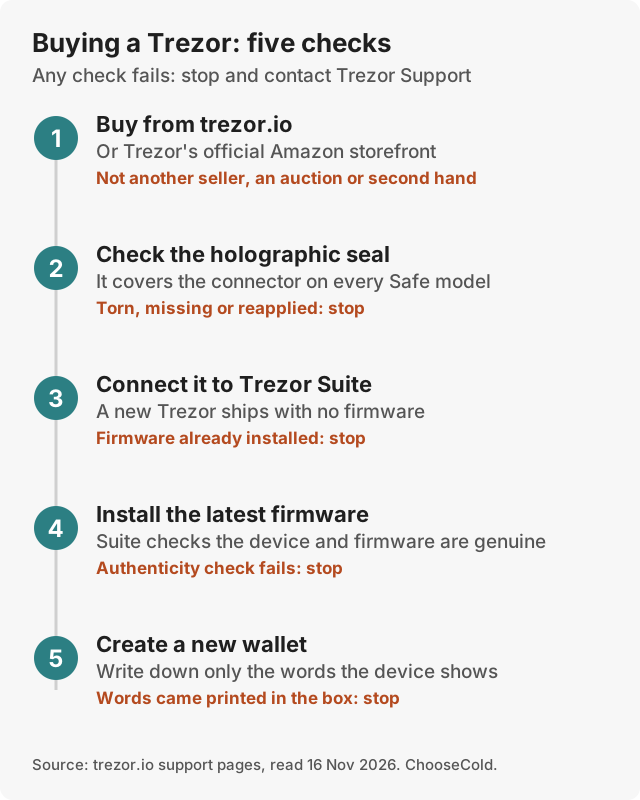
- Buy from trezor.io, an official reseller, or Trezor's official Amazon storefront.
- Check the holographic seal is intact.
- Trezors ship without firmware. If firmware is already installed, don't use it.
- Install firmware from Trezor Suite, which checks the device and firmware are genuine.
- Create a new wallet and write down the words the device shows. Never use words that came in the box.
Trezor Safe 3 alternatives
| Alternative | Price | Why choose it |
|---|---|---|
| Trezor Safe 5 | $129 | Same chip, touchscreen, microSD |
| Trezor Safe 7 | $249 | Full iPhone use over Bluetooth, two secure chips |
| Tangem | From $54.90 | Cards with no recovery words to store; no screen |
| Ledger Nano Gen5 | $179 | Touchscreen, Bluetooth and NFC |
| See Ledger | ||
Read our Trezor review, Trezor Safe 7 review and Tangem review, or the Trezor vs Ledger comparison.
Is the Trezor Safe 3 worth it?
Yes, for most people moving coins off an exchange for the first time, and for Bitcoin holders who rarely send. It gives the core protection of a hardware wallet for $59. Pay more for the Safe 5 if you want a touchscreen, or the Safe 7 if your phone is an iPhone.
Questions people ask
Is the Trezor Safe 3 safe?
Yes, for everyday use. It has an EAL6+ secure chip and published code. The 2025 attack needs the device in hand and lab equipment, and buying from Trezor plus Suite's authenticity check covers the realistic risk.
Is the Trezor Safe 3 worth it?
At $59 it is the best-value hardware wallet we recommend, especially for holding Bitcoin on a computer or Android phone.
Does the Trezor Safe 3 work with an iPhone?
Partly. Trezor Suite on iPhone shows balances, buys and receives. It can't send, swap or set up the device. To send from an iPhone, you need the Safe 7.
What is the difference between the Safe 3 and Safe 5?
The Safe 5 adds a 1.54-inch colour touchscreen and a microSD slot for $70 more. The chip grade and backups are the same.
How many backup words does the Trezor Safe 3 use?
New devices default to a 20-word backup. Trezor also lists 12- and 24-word backups, and a multi-share backup that splits the words into several shares.
What happens if I lose my Trezor Safe 3?
Restore your backup on another Trezor or a wallet app, then move your coins to a new wallet with a new backup. The lost device is PIN-protected and erases itself after 16 wrong tries.
Does the Trezor Safe 3 have Bluetooth?
No. It connects only by USB-C and has no battery.
Is there a Bitcoin-only Trezor Safe 3?
Yes, at the same $59. Its firmware supports only Bitcoin, which leaves less code on the device.