
Trezor review: which model to buy, and is it safe?
Some links on this page are affiliate links. If you buy through them, we may earn a commission at no extra cost to you. It never changes what we recommend. How we make money
Short answer
Trezor makes some of the safest hardware wallets you can buy, and most people should get the Trezor Safe 5 ($129). Choose the Safe 3 ($59) to save money, or the Safe 7 ($249) if you want to send coins from an iPhone. Buy it from trezor.io: in 2026 one reseller sold Safe 5s with a spying implant inside.
How we reviewed it: from Trezor's product, comparison, support and blog pages (read on 16 November 2026), published security research, and the reporting on every Trezor incident from March 2025 to November 2026. We haven't tested the devices hands-on, and we don't score anything we didn't check. We may earn a commission if you buy through our links. That doesn't change the rating or what we say about the incidents. The 8.8 rating is for the Safe 5 and weighs its security design, price, app support and Trezor's incident record (see how we rate); it loses most for the limited iPhone support and the 2026 partner leaks.
Pros
- Every current model has a certified EAL6+ secure chip
- Trezor publishes its device code for anyone to inspect
- You check and approve every payment on the device's own screen
- Flexible backup: 12, 20 or 24 words, multi-share backup and an optional passphrase
- $59 entry price for a device with a screen
- Works with more than 30 other wallet apps, including MetaMask, Electrum and Sparrow
Cons
- The Safe 3 and Safe 5 can't send, swap or be set up on an iPhone
- Only the Safe 7 has Bluetooth and a battery
- Two partner breaches in 2026 leaked customer contact details, followed by phishing
- A reseller sold implanted Safe 5s in 2026, so where you buy matters
- No exact coin count published, only "1000s"
Which Trezor to buy: Safe 3, Safe 5 or Safe 7
Trezor sells three hardware wallets. All three hold the same coins, use the same Trezor Suite app and offer the same backup options. They differ in the screen, in how you connect and in how you approve a payment.
Trezor Safe 5: the one most people should buy ($129)
The Safe 5 has a 1.54-inch colour touchscreen with haptic feedback, so you tap and swipe to approve instead of pressing two small buttons. Long addresses are easier to check on it than on the Safe 3. It connects by USB-C, has a microSD card slot and a certified EAL6+ secure chip. It is our top hardware pick in our best crypto wallets guide.
The Safe 5 is also the model in the 2026 implant case. That was a problem with one reseller, not with the device design, and the where to buy section explains how to avoid it.
Trezor Safe 3: the budget pick ($59)

The Safe 3 is the cheapest Trezor, and one of the cheapest hardware wallets with its own screen. The screen is a 0.96-inch monochrome display, and you confirm with two buttons. It has the same certified chip, backup options and coin support as the Safe 5, XRP and Solana included. The trade-off is the small screen, which shows less of a long address at a time.
In March 2025 Ledger's research lab showed an attack on the Safe 3's main processor. It needs the device in hand: the attacker has to remove the processor and apply precise voltage changes. Trezor said a determined attacker could "theoretically" use it to take the keys from a stolen device (The Block). If you worry about someone getting hold of the device, use a long PIN and add a passphrase.
Trezor Safe 7: for iPhone users and big screens ($249)
The Safe 7, announced in October 2025, adds what the other two lack: a 2.5-inch colour touchscreen, Bluetooth, a battery with Qi2 wireless charging and IP54 splash protection. Bluetooth is what gives it full iPhone support, including sending and trading. It has two secure chips: the EAL6+ chip used across the range, plus TROPIC01, a chip whose design is open to outside audit. If your only device is an iPhone, this is the Trezor to buy.

The Bitcoin-only editions
Each model also comes in a Bitcoin-only edition at the same price. It runs firmware that supports Bitcoin and nothing else. Less code means fewer places for a bug, which is why some people who hold only Bitcoin prefer it. If you might ever want another coin, buy the standard edition.
Trezor Safe 3 vs Safe 5 vs Safe 7: prices and specs
Prices are from Trezor's own shop on 16 November 2026. No sale was running.
| Safe 3 | Safe 5 | Safe 7 | |
|---|---|---|---|
| Price (US / EU / UK) | $59 / €59 / £49 | $129 / €129 / £109 | $249 / €249 / £209 |
| Screen | 0.96" monochrome, two buttons | 1.54" colour touchscreen | 2.5" colour touchscreen |
| Connection | USB-C | USB-C | USB-C, Bluetooth |
| Battery | No | No | Yes, with Qi2 wireless charging |
| Secure chip | Certified EAL6+ | Certified EAL6+ | Certified EAL6+, plus TROPIC01 |
| On an iPhone | Balances, buy and receive only | Balances, buy and receive only | Everything |
| Extras | None | microSD slot, haptic feedback | IP54 splash protection |
| Bitcoin-only edition | Yes, $59 | Yes, $129 | Yes, $249 |
| Check price | Check price | Check price |
Each comes with a USB-C to USB-C cable and two cards for writing down a 20-word backup. Trezor says the range supports "1000s of coins and tokens", including Bitcoin, Ethereum and its tokens, Solana, XRP and Cardano. For a less common coin, check Trezor's coin list before you buy, because a few coins work on some models only.
Is Trezor safe?
Yes, for what it is built to do: keep the keys to your coins on a device that never hands them to an internet-connected computer. A hardware wallet signs payments, meaning it approves them with your keys, inside the device. Your computer or phone only passes the signed payment on, so malware on the computer can't take the keys from a Trezor.
Four things back that up:
- A certified secure chip. Every current Trezor has a chip rated EAL6+, a Common Criteria grade from an independent lab evaluation that includes resistance to physical attacks. The Safe 7 adds a second chip, TROPIC01, whose design anyone can audit.
- Open code. Trezor publishes its code so anyone can read it. Outside researchers, Ledger's lab among them, test Trezor devices and publish what they find, and anyone can check Trezor's fixes in the code.
- The screen. You see the amount, the fee and the address on the device before you approve. If malware swaps the address on your computer, the Trezor screen shows the real one.
- PIN and passphrase. A stolen Trezor needs your PIN. A passphrase is an extra word you choose and keep separately. Without it, the backup words alone won't open the wallet.
Is a Trezor safer than keeping coins on Coinbase? It is a different kind of safety. On an exchange, the company holds your coins and you rely on it staying secure and solvent. With a Trezor, only you hold the keys, so no company failure can freeze your coins, but no one can recover them for you either.
The disadvantages of a Trezor
A hardware wallet protects the keys. It can't stop you approving the wrong thing or giving the backup away, and that is where most losses happen:
- Typing your backup words anywhere. No genuine app, website or support agent ever asks for them. Anyone who has the words has the coins, with or without the device.
- Fake emails and fake apps. After the 2026 data leaks, Trezor customers were sent convincing fake "security alerts". Download Trezor Suite only from trezor.io, and ignore any message that asks you to "verify" your wallet.
- Approving without reading. If the address on the Trezor screen doesn't match the one you meant to pay, reject the payment. If you don't understand what you are signing, don't sign it.
- Losing both the device and the backup. A lost Trezor can be replaced. Lost backup words can't. Keep the backup offline, safe from fire and water.
- A tampered device. The 2026 implant case showed that a device bought from the wrong seller can be compromised before you open it.
- Coins left on an exchange. A Trezor protects only the coins you move to it.
Two more are about convenience, not security: the Safe 3 and Safe 5 do little on an iPhone, and only the Safe 7 works without a cable.
Trezor's security record in 2025 and 2026
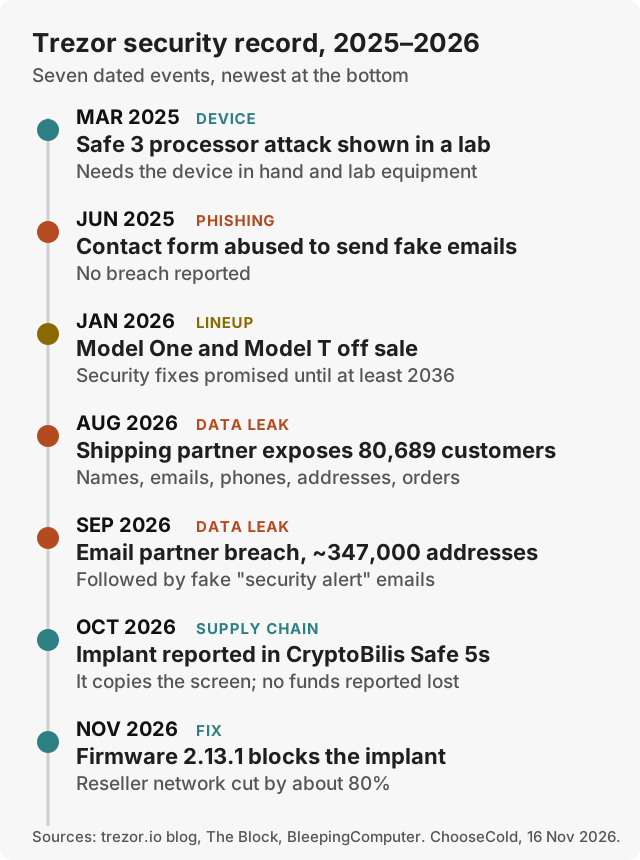
- March 2025, Safe 3 processor attack. Ledger's lab showed it could tamper with the Safe 3's main processor with the device in hand and lab equipment. Trezor said a determined attacker could only "theoretically" use it on a stolen device (The Block).
- June 2025, contact form abuse. Attackers used Trezor's support contact form to send phishing emails that appeared to come from Trezor. Trezor didn't report a breach (The Block).
- August 2026, shipping partner leak. A breach at ShipMonk, Trezor's shipping provider, exposed customers' names, emails, phone numbers, addresses and order numbers (for some, only name, city and email). Trezor first counted about 13,700 customers, mostly from orders placed between May and August 2026, then on 4 September added about 67,000 US customers from orders between 2019 and 2021, for 80,689 in total. Devices and backup words were not affected (Trezor blog, 13 August 2026, updated 4 September).
- September 2026, email partner breach. A breach at Brevo, Trezor's email service, led to phishing aimed at about 347,000 newsletter addresses, including a fake security alert (BleepingComputer).
- October and November 2026, the CryptoBilis implant. On 28 October a customer in Indonesia reported an extra circuit board inside a Safe 5 bought from CryptoBilis, an authorized Trezor reseller in Southeast Asia. Trezor confirmed the implant in three Safe 5s bought between 20 August and 23 September 2026 from CryptoBilis directly and through its Tokopedia and Shopee stores. The board sits between the main board and the screen and copies what the screen shows, recovery words and passphrase included, then sends it out over a mobile network. Trezor says no customer has reported losing funds and it has found the implant in no other model and no other reseller's devices. Firmware 2.13.1, released on 11 November, stops the implants found so far from capturing anything, though it can't protect a backup captured before the update, and Trezor has cut its reseller network by about 80% (Trezor blog, 12 November 2026).
Only one, a lab attack that needs the device in hand, found a weakness in a Trezor's design, and none broke the secure chip. The implant was added inside devices by a reseller; it didn't exploit a flaw and, Trezor says, didn't touch the firmware or the secure chip. The other three came through a contact form, a shipper and an email service. The real risks for a Trezor owner are fake emails that know your name and order, and a device bought from the wrong seller.
If you bought a Trezor from CryptoBilis since March 2026, Trezor will replace it. Keep the device, contact Trezor Support, and move your coins to a new wallet with new backup words, as Trezor advises, even after the firmware update.
Where to buy a Trezor, and how to check it's genuine
After the CryptoBilis case, Trezor's advice is to buy directly from trezor.io. Its support pages also name its official Amazon storefront and a list of authorized resellers by country on trezor.io/resellers. CryptoBilis was on that list until October 2026, which is why Trezor now points buyers to its own shop first. On Amazon, buy only from Trezor's official storefront, not from other sellers listing Trezor devices. Avoid auctions and second-hand devices, whatever the discount. In Trezor's words, "Never buy a Trezor from an unauthorized third party."
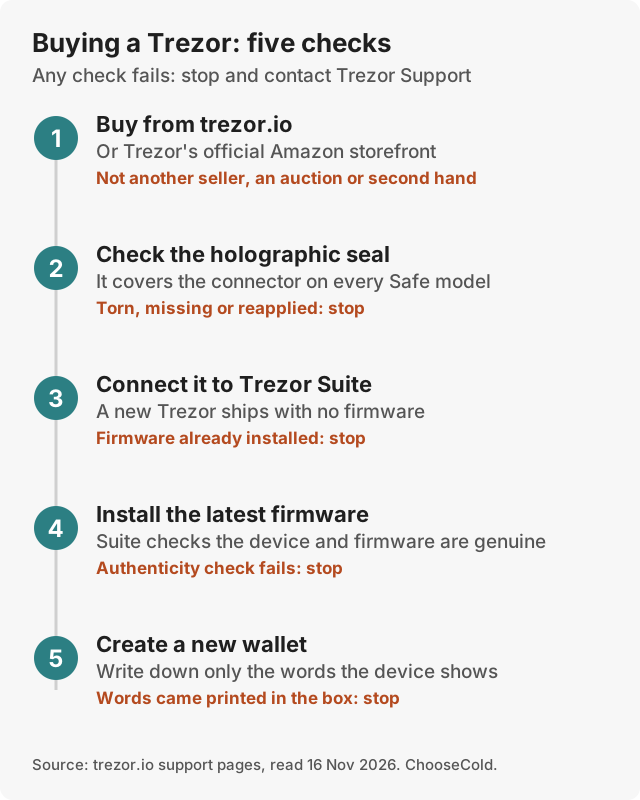
- Buy from the right place. trezor.io first, or Trezor's official Amazon storefront. Not another seller, an auction or a second-hand device.
- Check the seal. Every Safe model has a tamper-evident holographic seal over the connector. If it is torn, missing or looks reapplied, don't use the device.
- Check the firmware. Trezor ships every device without firmware. If Trezor Suite finds firmware already installed when you first connect, Trezor says the device should not be used.
- Let Suite check it. Install the latest firmware from Suite. During setup, Suite asks the secure chip to prove the device is genuine, and it checks the firmware too. If either check fails, Suite shows a warning: stop there.
- Check the backup. Use only the backup words the device shows you during setup. The backup cards in the box should be blank. If words are already printed or written on one, someone else knows them: don't use the device.
If any check fails, stop and contact Trezor Support before you put any money on it.
Trezor Suite and the iPhone question
Trezor Suite is Trezor's free app for macOS, Windows, Linux, Android and iOS. You use it to set up the device, check balances, send and receive coins and install firmware updates. From the app you can also:
- Buy and sell crypto through outside providers. Suite compares several providers for each trade.
- Stake Ethereum, Cardano and Solana.
Suite can also swap one coin for another through outside services.
On an iPhone it depends on the model. With a Safe 3 or Safe 5, the iOS app can show balances, buy crypto and receive it, but it can't send, swap, set up the device or manage it. The Safe 7 connects by Bluetooth and does everything on iOS. On Android and on a computer, every model works fully.
You don't have to use Suite. Trezor works with more than 30 other wallet apps, including MetaMask and Rabby for Ethereum apps, Electrum, Sparrow and Wasabi for Bitcoin, and Exodus. The keys stay on the Trezor whichever app you use.
Setting up a Trezor
- Run the five checks above before anything else.
- Install Trezor Suite from trezor.io and connect the device with the cable in the box.
- Install the firmware when Suite asks.
- Create a new wallet and choose a backup type. A standard 20-word backup suits most people. Multi-share backup splits it into several parts, so one stolen card isn't the whole key.
- Write the backup words on the cards in the box, in order. Don't photograph them or type them into anything.
- Set a PIN. Add a passphrase too, if you can keep it safe separately.
- Send a small test amount first, and check the receive address on the Trezor screen before you share it.
Trezor Model One and Model T: still worth buying?
No, not new or used. Trezor stopped selling both on 8 January 2026 and now lists them as discontinued. It says it will keep maintaining them until at least 2031 and provide security fixes until at least 2036, so if you own one, it still works and you don't need to replace it in a hurry.

The reason to upgrade is the secure chip. Trezor says the Safe 3 was its first device with a dedicated secure element, so neither the Model One nor the Model T has one (Coin Bureau). Without one, a device in a thief's hands is easier to attack. To move to a Safe model, set it up with new backup words and send your coins across, instead of typing the old backup words into the new device.

Trezor vs Ledger
Ledger is Trezor's main rival. Ledger prices are from Ledger's shop on 15 November 2026.
| Trezor | Ledger | |
|---|---|---|
| Cheapest current device with a screen | Safe 3, $59 | Nano S Plus, $69 |
| Secure chip | EAL6+ on every current model | EAL6+ on most models (EAL5+ on the Nano X) |
| Device code published | Yes | Partly: apps and the Ledger Wallet app are open, the device's operating system only in part |
| Bluetooth | Safe 7 only | Nano X, Nano Gen5, Flex and Stax |
| Check price | Check price |
Choose Trezor if open code and a lower entry price matter most. Choose Ledger if you want Bluetooth and an iPhone-friendly device for less than the Safe 7. Both have had customer data leaked through partner companies, and CryptoBilis sold implanted devices of both brands in 2026. Our best crypto wallets guide compares both with BitBox and Tangem.
Trezor alternatives
- Ledger Nano Gen5 ($179): Bluetooth and iPhone support for less than the Safe 7. See Ledger.
- BitBox02 Nova: a Swiss device with a Bitcoin-only edition and a microSD backup. See BitBox.
- Tangem Wallet ($54.90 for two cards): a card you tap on your phone, with no backup words unless you choose to create them. See Tangem.
Our verdict
Trezor is one of the safest places to keep crypto you don't spend. The current Safe range adds the certified secure chip the older models lacked and keeps the open code that sets Trezor apart. Its 2025 and 2026 record shows where the real risk lies: one lab attack, needing the device in hand, found a weakness in a Trezor's design; partner leaks made owners phishing targets; and one bad reseller sold tampered Safe 5s. Buy from trezor.io, run the five checks, and treat every email about your wallet as fake until proven otherwise.
Buy the Safe 5 if you're unsure, the Safe 3 to save money, and the Safe 7 if your phone is an iPhone.
Questions people ask
Can a Trezor wallet get hacked?
The published attacks on current Trezors need the device in hand and lab equipment, and a PIN and passphrase make them harder. The 2026 CryptoBilis implant was added before sale by a reseller, not by hacking the device remotely. The bigger everyday risk is typing your backup words into a fake app, site or email: anyone who has the words can take the coins.
Is the Trezor Safe 3 enough?
For most people, yes. It has the same certified secure chip, coin support and backup options as the Safe 5. You give up the touchscreen, which makes long addresses easier to check, and on an iPhone it can only show balances, buy and receive.
Can the Trezor Safe 3 hold XRP?
Yes. Trezor lists XRP as supported on the Safe 3, Safe 5 and Safe 7. Solana works on all three too.
Does Trezor report to the IRS?
Trezor makes the device and doesn't hold your coins or run an account for you. The companies you buy or sell through in Trezor Suite are separate providers with their own identity checks, and US brokers report customers' crypto sales to the IRS on Form 1099-DA, for sales from 2025 on. Owning a Trezor doesn't change what you owe in tax, so keep records of your trades (our CoinTracking review covers one way to do it).
Can you cash out on Trezor?
Yes. Trezor Suite has a sell feature that goes through outside providers, on a computer, on Android, and on an iPhone with a Safe 7. You can also send coins from your Trezor to an exchange account and sell there.
Is Trezor safer than Coinbase?
For coins you hold long term, a Trezor removes the risk of a company holding them for you, because only you have the keys. In exchange, you alone are responsible for the backup. Many people keep spending money on an exchange and savings on a hardware wallet.
Which Trezor wallet is best?
The Safe 5 ($129) for most people, the Safe 3 ($59) on a budget, and the Safe 7 ($249) if you use an iPhone or want Bluetooth.