
CoinTracking review: legit, safe and worth paying for?
Some links on this page are affiliate links. If you buy through them, we may earn a commission at no extra cost to you. It never changes what we recommend. How we make money
Short answer
CoinTracking is a legitimate crypto portfolio and tax tool, run from Munich since 2012. It suits people with several years of trades across many exchanges who want detailed control over their tax reports. Plans run from $49 a year for 200 transactions to $899 for unlimited, and the limit counts every past transaction. It is not the same company as CoinTracker, and scammers impersonate it, so use only cointracking.info.
How we reviewed it: from CoinTracking's home, pricing, guide and help pages (read on 16 November 2026), published reviews, store ratings and Reddit threads about scams that use its name. We haven't used a paid account hands-on. We may earn a commission if you buy through our links; that doesn't change the rating. The 7.5 rating weighs features, price, ease of use and trust (see how we rate). It scores highest on depth and country coverage, and loses most on price for large histories, the time it takes beginners to learn (which BitCourier's review notes), and auto-sync being held back to the $169 plan. This page isn't tax advice; check your report with a tax adviser.
Pros
- Running since 2012, based in Munich
- 400+ exchanges, wallets and DeFi sources, by its count
- Tax reports for 100+ countries, including Form 8949, Schedule D, HMRC and ATO formats
- 11 tax methods to choose from
- 14-day money-back guarantee
- Trustpilot 4.7 from 561 reviews; Google Play 4.6 from 7,208
Cons
- The transaction limit counts your whole history
- API auto-sync starts at Pro, $169 a year
- BitCourier's review says beginners may need time to learn all its functions
- The free plan becomes view-only after a 7-day trial
- Its name is used in recovery scams
CoinTracking key facts
| Fact | CoinTracking |
|---|---|
| Founded | 2012 |
| Based in | Munich, Germany |
| Website | cointracking.info |
| Integrations | 400+ exchanges, wallets and DeFi sources, by its count |
| Tax reports | 100+ countries |
| Tax methods | 11 |
| Price | Free trial, then $49 to $899 a year; Corporate from $1,799 |
| Payment | PayPal, card, Klarna, crypto (5% off in Bitcoin) |
| Refund | 14-day money-back guarantee |
| See CoinTracking |
From cointracking.info and cointracking.info/pricing, read 16 November 2026.
What CoinTracking does
CoinTracking collects your trades, deposits and withdrawals from exchanges and wallets into one record. From that it shows your portfolio and profit and loss, and produces tax reports: gains and losses for each sale, income, and the forms your country's tax office expects. Its UK report guide lists the income types it sorts, such as staking, mining, airdrops, lending and interest income, and LP rewards.
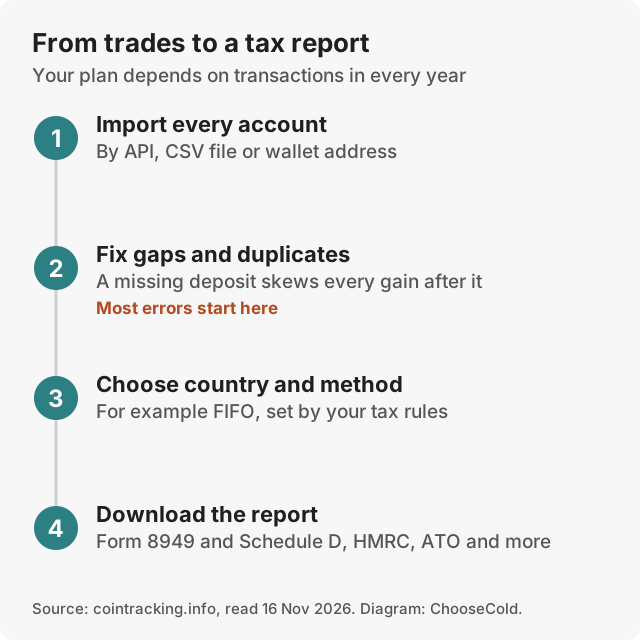
CoinTracking's guide names four ways to add data: uploading an exchange's CSV export, connecting an exchange's API so trades import on their own, entering transactions by hand, and importing a wallet's history from the blockchain by its public address. Then you review the gaps, such as coins that arrived with no record of where they were bought, and generate the report.
From your accounts to a tax report
CoinTracking's quick-start guide and import guide describe the route like this:
- Start with your largest exchange. Its guide says "Start with your largest exchange first, then work through the others."
- Load the history, then connect. "Most users use CSV import for historical data and set up an API connection going forward." API connection needs the Pro plan or higher.
- Add your own wallets. For a hardware wallet or MetaMask, enter the public address so CoinTracking reads its history from the blockchain.
- Check the data. The Balance Check compares what CoinTracking calculated with what your accounts really hold. A missing-and-duplicate check looks for gaps and double entries, and Account Validation flags other mismatches. CoinTracking says it removes exact duplicates on its own; near-duplicates need you.
- Choose your country and tax method, then generate the report.
- Have it checked. Give the report to your tax adviser or use it in your own return.
Most of the work is in step 4. A wrong balance usually means a missing import or a transfer that was counted twice, and either one changes your gains.
Common import problems and their fixes
CoinTracking's import guide lists the problems people hit most:
- Duplicate transactions, from overlapping date ranges or the same file uploaded twice. Run the Duplicate Transactions check under Analysis, then Checks. It catches exact copies on its own; look through the near-copies yourself.
- Missing transactions, because a trades-only export leaves out deposits, withdrawals or rewards. The guide's advice: "Download every available report category, not just the trades export."
- An API that misses older history. Many exchange APIs only go back so far. Export CSV files for the earlier years and upload them too; CoinTracking merges both.
- A file it doesn't recognise. Supported exchanges' files are mapped automatically. For anything else, use the generic CSV import, which needs a date, amount, currency, transaction type and fee for each row.
- Zero or wrong prices. CoinTracking fills prices in. If it can't, edit the entry and enter the price yourself.
Manual entry, under Import, then Other, suits a handful of trades the imports can't reach, such as a peer-to-peer trade or coins received as a gift. The guide calls it "impractical" for large numbers of trades. If an exchange offers no export at all, it suggests contacting the exchange about your historical data.
CoinTracking vs CoinTracker: not the same company
CoinTracking (cointracking.info) is a German company founded in 2012. CoinTracker (cointracker.io) is a separate company. The names are close enough that search results and AI answers mix them up, and many questions people ask about "CoinTracking" are about CoinTracker. Both are real; check the domain before you sign up or pay.
CoinTracking price
| Plan | Per year (US / EU) | Transactions | What it adds |
|---|---|---|---|
| Free | $0 | Trial | 7-day trial, then portfolio view only |
| Starter | $49 / €39 | 200 | Tax reports, 2 backups |
| Pro | $169 / €129 | 3,500 | API auto-sync, 5 backups |
| Expert | $259 / €219 | 20,000, 50,000 or 100,000 | Priority support, 10 backups |
| Unlimited | $899 / €769 | Unlimited | Advanced tools, an expert session, 20 backups |
| Corporate | From $1,799 / €1,599 | 3 unlimited accounts included | $299 / €249 per extra account |
| Check CoinTracking's plans | |||
Prices from cointracking.info/pricing on 16 November 2026. Expert is shown at $259 with three transaction tiers; check the price for your tier. Two-year and lifetime options exist; the page showed a "10% off" banner, and it wasn't clear whether listed prices included it.
How the transaction limit works
CoinTracking's pricing FAQ says "all historical transactions count toward the limit". Someone with 250 trades over five years needs Pro, even if they made ten trades this year. Count your history before you buy. A rough guide is the number of rows in your exchange exports.
The bigger jump is auto-sync. On Starter you upload CSV files yourself; connecting exchanges by API starts at Pro, $169 a year. If you trade on several exchanges, the time saved usually decides the plan.
Which plan you need: three examples
- A long-term holder. You bought Bitcoin on one exchange about once a month for three years and moved it to a Trezor once. That is under 50 rows. Starter, $49, covers it, and you upload one CSV a year.
- An active trader on three exchanges. 1,200 trades over five years, and you want new trades to arrive on their own. You are over Starter's 200, under Pro's 3,500, and you need the API. Pro, $169.
- A bot or high-volume trader. 15,000 trades. Pro's 3,500 is too small, so the 20,000 tier of Expert is the step up. Past 100,000, only Unlimited, $899, fits.
Leave room for growth. Your history only gets longer, and next year's report counts this year's trades too.
Paying and refunds
CoinTracking takes PayPal, cards, Klarna and crypto, the last through NOWPayments and Crypto.com, with a 5% discount for paying in Bitcoin. It offers a 14-day money-back guarantee, so you can import your history, check the report, and cancel if it doesn't fit.
Tax reports and countries
CoinTracking says it produces tax reports for more than 100 countries. For the US that includes Form 8949 and Schedule D; for the UK, HMRC-format reports; for Australia, ATO-format reports. It offers 11 tax methods, the rules that decide which coins you sold first when you bought at different prices.
The tax methods it names
CoinTracking's guide to methods describes these:
- FIFO, first in, first out: the coins you bought earliest count as sold first. The guide calls it the IRS default.
- LIFO, last in, first out: your most recent purchases count as sold first. The guide says the IRS doesn't clearly approve it as a standalone method for crypto.
- HIFO, highest in, first out: the coins with the highest purchase price count as sold first.
- Specific identification: you choose which coins you sold, with records made at the time. The guide says HIFO and LIFO work under this rule in the US.
- Average cost.
- Country rules: Section 104 pooling for the UK, where the guide says FIFO, LIFO and HIFO aren't allowed; adjusted cost base averaging for Canada; and FIFO for private investors in Germany, under § 23 of the German income tax act (EStG).
The guide says you can change method from one tax year to the next, and should keep one method within a year. For a switch after years of FIFO, it suggests a crypto tax professional. Which method you may use depends on your country, so check with an adviser before choosing.
What a UK report contains
CoinTracking's help desk walks through its UK report section by section. It separates realised gains and losses on crypto under section 21 of the Taxation of Chargeable Gains Act, then gains and losses on derivatives, then miscellaneous income such as staking, mining and airdrops. Income you mark as non-taxable, and other crypto and NFT payments, go in their own sections. That layout lets an adviser see each type of gain apart from the others. Reports for other countries follow their own forms, such as Form 8949 and Schedule D in the US.
What reviewers say
CryptoSlate scored it 6.9 out of 10 in October 2026, saying it suits investors preparing several years of reports who want detailed control. BitCourier's review says users don't need to be advanced with computers, and also that "it may take time for beginners to grasp all the functions" it offers. It adds that the mobile app lacks some features of the web version. On Trustpilot it rated 4.7 from 561 reviews, and on Google Play 4.6 from 7,208.
Does CoinTracking report to the IRS?
CoinTracking makes reports for you to file; it doesn't file them for you or send your data to tax offices on its own, as far as its pages describe. Your exchanges may report to tax offices themselves, which is one more reason your CoinTracking report should match their records, row for row, before you file it.
Is CoinTracking safe and legit?
Yes, the company is real and established: a Munich business running since 2012, with a 4.7 Trustpilot rating from 561 reviews and 4.6 on Google Play from 7,208. We found no published report of a CoinTracking data breach, though we couldn't confirm its security claims ourselves.
Two points keep you safe with any tax tool:
- Give exchange API keys view access only. When you create a key on an exchange, most let you choose what it can do. CoinTracking's own guide says to "enable read-only or view permissions only; disable all trading and withdrawal permissions".
- Never enter recovery words. A tax tool needs your public addresses at most. CoinTracking's guide says never to share your recovery phrase or private key.
The CoinTracking recovery scams
Threads on r/phishing and r/Bitcoin describe fake sites and accounts using the CoinTracking name. The usual pattern: after someone loses money to a scam, a "recovery" service or a fake tracking dashboard shows their lost coins as recoverable for a fee. The replies point out that the real CoinTracking is a tax tool at cointracking.info and doesn't recover funds.
Signs it is a scam:
- Someone contacts you first, after you lost money, and offers to get it back.
- They ask for a fee, a "tax" or a deposit before you get anything. The US Federal Trade Commission's advice is plain: "Never pay upfront for a refund or help with a refund."
- They want payment in crypto, gift cards or a wire transfer. The FTC says demands like these point to a scammer.
- The dashboard is on any domain other than cointracking.info, or shows a balance you can only withdraw after paying.
- They ask for your recovery words, private key or remote access to your computer.
If you were targeted, stop paying, keep the messages, and report it. In the US that is ReportFraud.ftc.gov.
Is it safe to link CoinTracking to Coinbase?
With a view-only API key, the risk is limited: anyone who stole the key could see your history but not move your coins. CoinTracking's guide says that for Coinbase Advanced Trade you should make sure "only the View (read-only) checkbox" is ticked. Delete the key in Coinbase if you stop using CoinTracking.
What CoinTracking doesn't do
- It doesn't hold or protect your crypto. It keeps a record of your coins. It doesn't store them. For storage, see our best cold wallets.
- It doesn't guarantee a correct report. Missing imports and unmatched transfers create wrong gains. Review the gaps before filing.
- It doesn't file your taxes or replace an adviser for complex cases.
- It doesn't recover lost or stolen funds. Anyone saying otherwise is impersonating it.
CoinTracking with a hardware wallet
Coins on a Trezor or Ledger still need to be in your tax record. CoinTracking's guide says moving crypto to cold storage "isn't a taxable event", but that "CoinTracking needs to see both sides of the move" to keep the purchase price right. In practice:
- Import the exchange you bought on, so the withdrawal is in the record.
- Add the hardware wallet by its public address, so CoinTracking reads the deposit from the blockchain. For Trezor, CoinTracking's help desk also describes exporting the transaction history as a CSV from Trezor's app and uploading it with its Trezor importer, choosing the date format the file uses.
- Check that the withdrawal and the deposit match up as a move between your own accounts. If they don't, the move can show up as a sale.
- Run the Balance Check and compare it with what the wallet shows.
Never give a tax tool your recovery words to do this. The public address is enough.
CoinTracking alternatives
| Choose | If you |
|---|---|
| CoinTracking | Have years of history across many exchanges and want detailed control |
| Another tax tool, such as CoinTracker or Koinly | Want to compare tools before you pay |
| Your exchange's own tax export | Used only one exchange and never moved coins elsewhere |
| A crypto tax accountant | Have DeFi, business income or several countries |
| Try CoinTracking |
Is CoinTracking worth it?
For a long, messy history, yes: the country coverage, tax methods and level of control suit people with years of trades on many exchanges. For a few trades on one or two exchanges, it is more tool than you need, and the 200-transaction Starter plan without auto-sync may still leave you uploading files by hand. Use the 14-day money-back guarantee to check your own report before you commit.
Our verdict
CoinTracking is a real, long-running tax tool with deep country coverage and many tax methods. Its strengths show with a long history: years of trades, several exchanges, wallets and income to sort. Its costs show there too, because the limit counts every past transaction and auto-sync starts at $169. Count your transactions, pick the smallest plan that fits with room to grow, import everything, and run the balance and duplicate checks before you trust a number. Then take the report to an adviser. Keep your coins themselves in a hardware wallet, and add it to CoinTracking by its public address only.
Questions people ask
Is CoinTracking trustworthy?
Yes. It is a Munich company running since 2012, rated 4.7 on Trustpilot from 561 reviews. Scammers use its name, so only use cointracking.info.
Is CoinTracking the same as CoinTracker?
No. CoinTracking (cointracking.info) is German; CoinTracker (cointracker.io) is a separate company.
Does CoinTracking report to the IRS?
It produces reports, such as Form 8949 and Schedule D, for you to file. Its pages don't describe sending data to tax offices.
How much does CoinTracking cost?
From $49 a year for 200 transactions, $169 for 3,500 with auto-sync, up to $899 for unlimited, on 16 November 2026. The limit counts your whole history.
Which tax methods does CoinTracking support?
It says it offers 11. Its guides name FIFO, LIFO, HIFO, specific identification and average cost, plus country rules such as UK Section 104 pooling and Canada's adjusted cost base. Ask an adviser which your country allows.
Is it safe to link CoinTracking to Coinbase?
Yes, if the API key you create in Coinbase can only view your account. CoinTracking's guide says to tick only the View (read-only) box.
Can CoinTracking recover stolen crypto?
No. It is a tax and portfolio tool. Anyone offering recovery in its name for a fee is a scammer.
How do I add a hardware wallet to CoinTracking?
Enter the wallet's public address so CoinTracking reads its history from the blockchain, or, for a Trezor, upload the CSV export through its Trezor importer. Make sure the exchange withdrawal and the wallet deposit match as a move between your own accounts. Never enter recovery words.
Can I enter trades by hand in CoinTracking?
Yes. Manual entry is under Import, then Other. CoinTracking suggests it for a few trades its imports can't reach, such as peer-to-peer trades or gifts, and calls it impractical for large numbers.
Is CoinTracking free?
Only for a 7-day trial. After that, the free plan shows your portfolio but no tax reports.