
Trezor Safe 7 review: is it worth $249?
Some links on this page are affiliate links. If you buy through them, we may earn a commission at no extra cost to you. It never changes what we recommend. How we make money
Short answer
The Trezor Safe 7 ($249) is the most complete Trezor: a 2.5-inch colour touchscreen, Bluetooth with full iPhone support, a battery with Qi2 wireless charging, IP54 splash protection and two secure chips, one of them auditable. It is worth $249 if you use an iPhone or want the best Trezor. On a computer or Android phone, the Safe 5 ($129) gives the same core protection for about half the price.
How we reviewed it: from Trezor's product, comparison, setup guide, support and blog pages, and Tropic Square's site (read on 16 November 2026), published reviews and owner threads, and the reporting on Trezor's 2025 and 2026 incidents. We haven't tested the Safe 7 hands-on. We may earn a commission if you buy through our links; that doesn't change the rating. The 8.6 rating weighs security design, ease of use, price and Trezor's record (see how we rate). The Safe 7 scores highest of any Trezor on design and ease, and loses most on price against the Safe 5 and on Trezor's 2026 partner leaks.
Pros
- The only Trezor with full iPhone support: send, swap and set up
- Two secure chips: EAL6+ plus TROPIC01, whose design is published
- 2.5-inch colour touchscreen at 700 nits, under Gorilla Glass 3
- Battery with Qi2 wireless charging; IP54 splash protection
- Published device code; Bitcoin-only edition at the same price
Cons
- $249, nearly double the Safe 5
- Bluetooth and a battery add parts the Safe 3 and Safe 5 don't have
- No air-gapped (QR or microSD-only) signing
- Trezor's 2026 partner leaks and the CryptoBilis reseller case
What the Trezor Safe 7 is
The Safe 7 is Trezor's top hardware wallet, announced on 23 October 2025. It keeps your private keys on secure chips, offline, and shows every payment on its own screen so you can check the amount and address before you approve. You manage coins in Trezor Suite on a computer, iPhone or Android phone, or in more than 30 other wallet apps.

It is the first Trezor with Bluetooth and a battery. Those two additions are what let it work fully with an iPhone, which the Safe 3 and Safe 5 can't: on iOS they only show balances, buy and receive.
Trezor Safe 7 specifications
| Price | $249 / €249 / £209 (trezor.io, 16 November 2026) |
| Screen | 2.5" colour touchscreen, 520 x 380 pixels, 700 nits, haptic feedback |
| Chips | TROPIC01 (auditable secure chip), Infineon Optiga EAL6+ secure chip, STM32U5 processor |
| Body | Anodised aluminium unibody, glass back; Charcoal Black or Obsidian Green |
| Connections | USB-C, Bluetooth 5.0+ |
| Battery | LiFePO4, 3.2 V, 330 mAh; Qi2 wireless charging |
| Protection | IP54 against dust and splashes |
| Phones | Full iPhone and Android support in Trezor Suite |
| Backup | 12, 20 or 24 words; multi-share backup; passphrase |
| PIN | 4 to 50 digits; the wallet is erased after 10 wrong tries |
| Editions | Standard and Bitcoin-only (Bitcoin Orange), same price |
| In the box | USB-C cable, two 20-word backup cards, start-up guide, stickers |
Trezor Safe 7 price, and the other Trezors
| Safe 3 | Safe 5 | Safe 7 | |
|---|---|---|---|
| Price (US / EU / UK) | $59 / €59 / £49 | $129 / €129 / £109 | $249 / €249 / £209 |
| Screen | 0.96" mono, buttons | 1.54" colour touch | 2.5" colour touch |
| Secure chip | EAL6+ | EAL6+ | EAL6+ plus TROPIC01 |
| Bluetooth and battery | No | No | Yes |
| iPhone | Balances, buy, receive | Balances, buy, receive | Full |
| microSD | No | Yes | No |
| Check the Safe 7 at Trezor | |||
Prices from trezor.io on 16 November 2026, before shipping and tax.
Security: two secure chips
The Safe 7 carries two secure chips and a main processor, which Trezor says come from three different vendors. One secure chip is the Infineon Optiga, certified EAL6+, the same chip grade as the Safe 3 and Safe 5. The other is TROPIC01, which Trezor calls the "World's first auditable Secure Element": its design is open, so outside researchers can check how it protects your keys. TROPIC01 comes from Tropic Square, which says it "develops auditable, tamper-resistant secure elements" and describes itself as "a SatoshiLabs company", so it sits in the same group as Trezor. For comparison, Ledger doesn't publish the low-level code that talks to its devices' secure chip. Trezor describes the Safe 7 as "100% open-source code". Trezor's comparison page calls the pair a "Dual Secure Element architecture".
Trezor also calls the Safe 7 "quantum-ready": the device checks its boot code and firmware with a signature scheme (SLH-DSA-128) designed to hold up against future quantum computers. That protects the device's own updates; it doesn't change how Bitcoin or other coins sign payments, which is up to each network.
Is Bluetooth a risk?
The Bluetooth link uses Trezor's open-source Trezor Host Protocol (THP), which Trezor says "encrypts every command and transaction". The keys stay on the device, and you approve each payment on its screen. Trezor's Bluetooth guide describes pairing like this: pick "Pair new device" on the Safe 7, check that the same pairing code shows on both screens, and type in a one-time code the device shows. If you'd rather not use Bluetooth, you can turn it off and connect by USB-C.
Not every reviewer is convinced. Bitcoin Magazine's reviewer argues that any radio link moves a device from cold storage toward a "warm" wallet, and would like a hardware switch that cuts the antenna. There is no such switch. The off setting is in the software.
Trezor's incident record
We found no published attack on the Safe 7. Trezor's other incidents since 2025:
- March 2025: a lab attack on the Safe 3's processor, device in hand; Trezor said a determined attacker could "theoretically" use it (The Block).
- August 2026: shipping partner ShipMonk leaked the names, emails, phone numbers and addresses of 80,689 customers.
- September 2026: email partner Brevo was breached, and phishing went to about 347,000 newsletter addresses.
- Aug-Sep 2026 (disclosed Nov): Safe 5s bought from the reseller CryptoBilis between 20 August and 23 September 2026 had an implant fitted inside. Trezor disclosed it in November 2026: firmware 2.13.1 on 11 November, then a post on 12 November. 48 customers came forward, no customer has reported losing funds, and firmware 2.13.1 blocks the CryptoBilis implants.
Our Trezor review covers each in full.
Screen, battery and build
The 2.5-inch screen is the biggest step up from the Safe 5's 1.54 inches. It has 520 by 380 pixels, 700 nits of brightness and a Gorilla Glass 3 cover, and haptic feedback confirms each tap. Bitcoin Magazine's reviewer found the larger on-screen buttons cut down on mistyped PINs. Trezor uses the same Gorilla Glass 3 on the Safe 3 and Safe 5 screens.
The battery is LiFePO4, 330 mAh, with built-in overheating protection. Trezor says it "outlasts standard lithium batteries", with four times the charging cycles. It charges by USB-C or on a Qi2 wireless charger. If the battery ever fails, Trezor says the Safe 7 still works powered by its USB-C cable.
The body is anodised aluminium, milled from a single block, with an NCVM-coated glass back and an IP54 rating against dust and water. The Safe 3 and Safe 5 are plastic. The standard edition comes in Charcoal Black and Obsidian Green, and the Bitcoin-only edition in Bitcoin Orange.
How to set up the Trezor Safe 7
Trezor's own guide says setup takes about 15 minutes. You need the device, the backup cards from the box and a pen. These are the steps as Trezor documents them:
- Check the box and seal. Run the genuine checks further down this page before you power it on.
- Install Trezor Suite from trezor.io on a computer, iPhone or Android phone.
- Connect. On a computer, use USB-C or Bluetooth. On a phone, Trezor recommends Bluetooth; Android also works by cable. On an iPhone, Bluetooth is the only option.
- Install the firmware. The Safe 7 ships without any. On a computer, you can choose Standard or Bitcoin-only firmware at this step.
- Let Suite run the authenticity check on the secure chip, and follow the prompts on the device.
- Create a new wallet. By default Suite suggests a Single-share Backup of 20 words. Write all 20 in order on one of the backup cards.
- Set a PIN of 4 to 50 digits. After 10 wrong tries, the device erases the wallet, so the backup is what gets you back in.
- Check your backup with the recovery check in Suite, then send a small test amount before moving savings.
Backup options: 20 words, multi-share and passphrase
The backup is a list of words that can rebuild your wallet on another device. Trezor offers three kinds on the Safe 7.
- Single-share Backup (20 words). The default on Trezor's Safe devices since June 2024. It uses Trezor's SLIP39 standard. One card holds everything, so whoever has that card has your coins.
- Multi-share Backup. The backup is split into between 1 and 16 shares, and you set how many are needed to recover. In Trezor's example of 3-of-5, any three of five shares rebuild the wallet. You could keep shares in different places, so one stolen or lost share is not enough to take or lose the wallet. You can upgrade from a Single-share Backup later in Suite and keep the same accounts. Trezor warns that the old 20-word card "is still valid!" after an upgrade, so destroy it only once you have checked the new shares.
- 12 or 24 words. Trezor's product page also lists 12- and 24-word backups. These use the older BIP39 standard, which more wallet apps read than SLIP39.
A passphrase sits on top of any of these. It is an extra word or phrase you choose that opens a separate wallet. Trezor says that with it on, even someone holding your device or your backup can't reach those accounts. The catch: nobody can recover a forgotten passphrase.
One caution from Bitcoin Magazine's review: SLIP39, the format of the 20-word backup, works in Sparrow and Electrum. The reviewer adds that it has "far less adoption than its predecessor", the older BIP39 format. If you might move to another brand of wallet one day, check that it reads SLIP39 first.
Trezor Suite and supported coins
Trezor says the Safe 7 supports "1000s of coins & tokens", including Bitcoin, Ethereum, Solana, Cardano, XRP and ERC-20 tokens. Trezor doesn't publish an exact count. You manage them in Trezor Suite, which runs on macOS, Windows, Linux, iOS and Android. According to Trezor's Suite page, it lets you:
- buy and sell coins, comparing several providers on price;
- swap one coin for another;
- stake Ethereum, Cardano and Solana;
- pick which coins to spend (coin control) and route traffic over Tor;
- hide balances with Discreet mode, and get warnings about address poisoning;
- use MEV protection, and open hidden wallets behind a passphrase.
On a computer you can buy, sell, stake, swap and send. On a phone, Trezor lists buying, selling and sending. The Safe 7 is the only Trezor with full iPhone support, because the Safe 3 and Safe 5 connect only by cable, and on iOS Trezor lists "No swap, send, setup or device management" for them. Beyond Suite, Trezor says the device works with more than 30 other wallet apps, including MetaMask, Rabby, Electrum, Exodus and Wasabi.
The Bitcoin-only edition
The Bitcoin-only Safe 7 costs the same $249 and comes in Bitcoin Orange. Trezor describes Bitcoin-only firmware as "a lightweight version supporting only BTC accounts", with fewer updates and "reduced potential for bugs". You give up the other coins and features such as FIDO2 and U2F logins, which need the standard firmware.
You don't need the orange edition to run Bitcoin-only firmware. On a standard Safe 7 you can choose it at setup or switch later in Suite under Settings, Device, Firmware, and Trezor says switching doesn't cost you your other coins; Suite just stops showing them. The orange edition can't switch to the standard firmware.
If you lose the Safe 7, or Trezor disappears
Your coins live on the blockchain, and the backup is what controls them. The device is a safe way to use that backup. Trezor's guidance on a lost or stolen device is to treat it as a threat: restore your backup on a spare Trezor or a wallet app, set up a new wallet with a new backup, and move all your coins to it. A thief also faces the PIN, and the wallet is erased after 10 wrong tries.
If you lose the backup but still have the device, Trezor says the backup "cannot be re-generated in any way". Create a new wallet with a new backup and move your coins there. If you lose both, Trezor says "there's no way to recover your accounts."
If Trezor itself went away, the company says its hardware designs and software are published, so others could keep them going. It also says Trezor backups can be recovered in open-source wallets such as Electrum. Keep a note of which backup type you chose, because the wallet you restore into needs to support it.
Safe 3 vs Safe 5 vs Safe 7: which to buy
All three share the EAL6+ secure chip, the backup options, the coins and Trezor Suite. Pick by how you'll use it.
- Safe 3 ($59): you hold coins and rarely send, use a computer or Android phone, and want to spend the least. You approve with two buttons on a 0.96-inch screen.
- Safe 5 ($129): you send now and then and want a colour touchscreen, on a computer or Android phone. This is our overall pick.
- Safe 7 ($249): your main device is an iPhone, you want to use the wallet without a cable, or you want TROPIC01 as a second secure chip.
The top answer in an r/TREZOR thread asking whether the Safe 7 is worth more than twice the Safe 3 points to the Safe 5 as the balance. We agree for most people. Our Trezor review compares all three in more detail.
What owners and reviewers say
Bitcoin Magazine (Juan Galt, 28 September 2026, on a unit Trezor supplied free) praises the larger screen buttons, which cut PIN typos, and the metal body, which feels more mature than older plastic Trezors. The criticisms: Bluetooth over THP still makes it a warm wallet in the reviewer's view, with no hardware switch to cut it; the 20-word SLIP39 backup has "far less adoption than its predecessor"; you can't add your own randomness when creating a wallet; and Trezor's shipping-partner leak is a reason to ship to a P.O. box.
hardware-wallets.net scores it 97%. On r/TREZOR, one thread title calls it the "highest-quality hardware wallet", while another asks whether it is worth more than twice the Safe 3; the top answer there points to the Safe 5 as the balance. ForrestHODL's unsponsored video review faults it for having no air-gapped signing, where the device never connects by cable or radio at all.
What the Safe 7 doesn't protect you from
- Typing your recovery words into anything. No real Trezor app, site or support agent asks for them, and after the 2026 leaks, phishing emails did.
- Approving without reading the address and amount on the screen.
- Losing both the device and the backup cards.
- A tampered device from an unofficial reseller, as in the CryptoBilis case.
- Someone forcing you to open it. A passphrase can hide a second wallet, but no device stops coercion.
How to check your Safe 7 is genuine
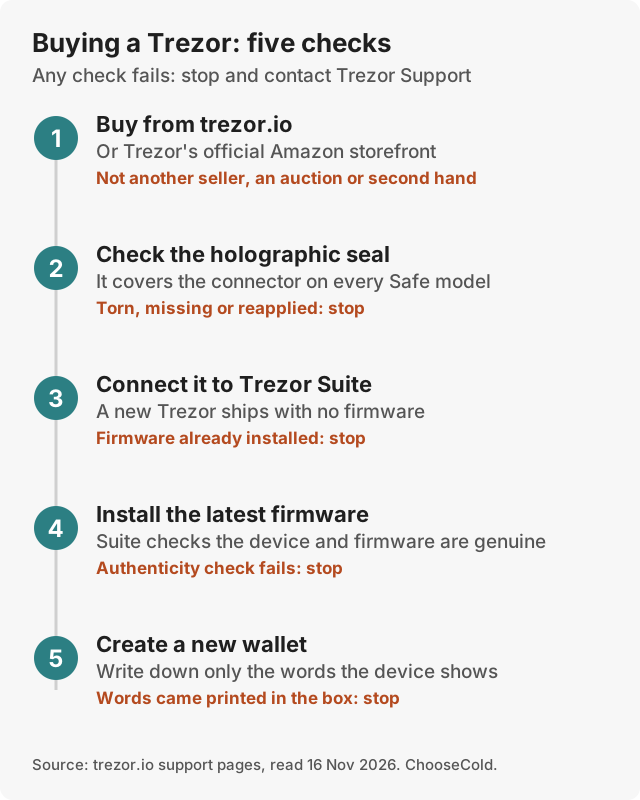
- Buy from trezor.io, an official reseller on Trezor's list, or Trezor's official Amazon storefront.
- Check the tamper-evident holographic seal over the USB-C port.
- Trezors ship without firmware. If firmware is already installed, don't use the device.
- Install the latest firmware from Trezor Suite, which checks that the device and firmware are genuine.
- Create a new wallet and write down the words the device shows. Never use words that came printed in the box.
Trezor Safe 7 alternatives
| Alternative | Price | Why choose it |
|---|---|---|
| Trezor Safe 5 | $129 | Same EAL6+ chip and published code; no Bluetooth or full iPhone use |
| Ledger Nano Gen5 | $179 | Bluetooth, NFC and a 2.8" E Ink screen for $70 less |
| Ledger Flex | $249 | Same price, bigger E Ink screen, NFC; Ledger doesn't publish the low-level code that talks to its secure chip |
| Ledger Stax | $399 | The largest screen, wireless charging |
| See Ledger | ||
See our Trezor vs Ledger, Trezor Safe 3 review and best hardware wallets.
Is the Trezor Safe 7 worth it?
If you use an iPhone and want a Trezor, yes: it is the only one that does everything on iOS. If you want the most auditable Trezor, also yes, because of TROPIC01. If you use a computer or Android phone and mostly hold, the Safe 5 gives the same EAL6+ protection and published code for $120 less.
Questions people ask
Is the Trezor Safe 7 worth it over the Safe 5?
For iPhone users, yes. On a computer or Android, the Safe 5 at $129 gives the same core security; the Safe 7 adds a bigger screen, Bluetooth, a battery and the TROPIC01 chip for $120 more.
Does the Trezor Safe 7 work with an iPhone?
Yes, fully. Over Bluetooth it can send, swap and be set up from Trezor Suite on an iPhone.
When was the Trezor Safe 7 released?
Trezor announced it on 23 October 2025.
Is Bluetooth on the Safe 7 safe?
Trezor encrypts the link with its open-source Trezor Host Protocol, the keys stay on the device, and you approve every payment on its screen. You can also turn Bluetooth off and use USB-C only.
What coins does the Trezor Safe 7 support?
The same as other Trezors: Trezor lists "1000s of coins & tokens", including Bitcoin, Ethereum, Solana and XRP.
Does the Trezor Safe 7 have a battery?
Yes, a 330 mAh LiFePO4 battery, charged by USB-C or a Qi2 wireless charger. If it fails, the device still runs on USB-C power.
What happens if I lose my Trezor Safe 7?
Restore your backup on another Trezor or a wallet app, then move your coins to a new wallet with a new backup. The PIN protects the lost device, which erases itself after 10 wrong tries.