
Hot wallet vs cold wallet: what's the difference?
Some links on this page are affiliate links. If you buy through them, we may earn a commission at no extra cost to you. It never changes what we recommend. How we make money
Short answer
A hot wallet keeps your private keys in an app on a phone or computer that is online. A cold wallet keeps them on a separate device that stays offline and signs payments without exposing them.
Use a hot wallet if you spend, trade or use apps often with small amounts. Use a cold wallet if you hold savings you rarely touch. Most people who hold more than a small amount use both.
This page is researched from the wallet makers' own pages, published security incidents in 2025 and 2026, and the questions people ask most about the two. We may earn a commission if you buy a cold wallet through our links; it doesn't change what we recommend.
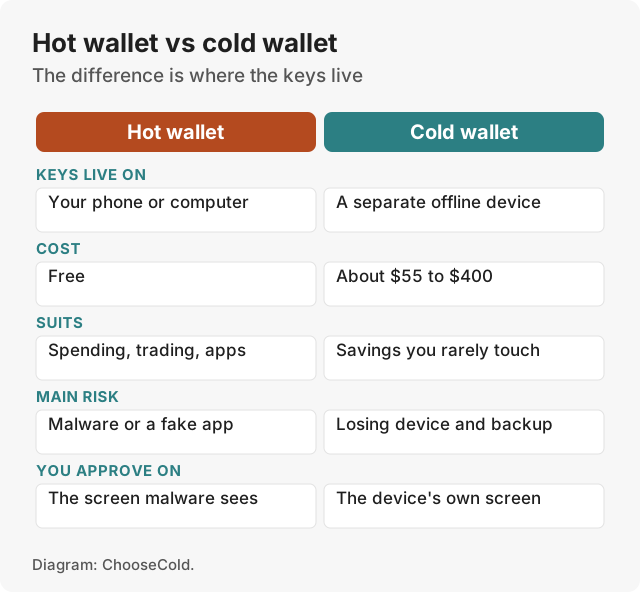
Hot vs cold wallet compared
| Hot wallet | Cold wallet | |
|---|---|---|
| Where the keys live | An app on an online phone or computer | A separate device that stays offline |
| Cost | Free | About $55 to $400 |
| Best for | Spending, trading, apps | Savings you rarely move |
| Where you approve | On the same screen malware could see | On the device's own screen |
| Main risk | Malware, fake apps, phishing | Losing both the device and the backup |
| Speed | One tap | An extra step on the device |
| Examples | MetaMask, Trust Wallet, Exodus, Coinbase Wallet | Trezor, Ledger, BitBox, Tangem |
| See Trezor |
Cold wallet prices from the makers' shops on 15 and 16 November 2026: Tangem from $54.90, Ledger Stax $399.
What is a hot wallet?
A hot wallet is wallet software on a device connected to the internet: a phone app, a browser extension or a desktop program. The private keys are created and stored on that device, usually encrypted. Because the device is online, a payment is one tap away, and the wallet connects directly to apps and exchanges.
That convenience is the risk. Anything that can run on the phone or computer can, in principle, reach the keys or change what you see.
The Trust Wallet extension theft
The clearest recent example came on Christmas Day 2025. Trust Wallet reported a "security incident impacting Trust Wallet Browser Extension version 2.68", a Chrome extension update that had just gone out. Funds were taken from hundreds of users. The investigator ZachXBT counted over $6 million from an initial list of theft addresses, and Binance founder Changpeng Zhao later put it at $7 million and wrote that Trust Wallet would cover the losses.
Trust Wallet told users to disable the extension and upgrade to version 2.69, and not to open it until the upgrade was done. It said mobile-only users and other extension versions were not affected. The root cause had not been confirmed when The Block reported it (The Block).
The owners did nothing wrong. They used a real wallet from its real maker, and an update to it emptied their accounts. A cold wallet guards against exactly this: a hot app connected to one can show a balance and prepare a payment, but it can't sign without the device.
What is a cold wallet?
A cold wallet keeps the keys on a separate device that never connects to the internet itself. Your phone or computer prepares the payment, the device shows it on its own screen, you approve it there, and only the signature goes back. Malware on the phone can't read the keys, and if it swaps the address, the device screen shows the real one.
Most cold wallets are hardware wallets: small devices from Trezor, Ledger and BitBox, or cards like Tangem's. Our best cold wallets guide ranks them.
Some cold wallets are air-gapped: they never connect by cable to the computer that prepares the payment. The Keystone 3 Pro passes payments to and from the device as QR codes. Coinkite's Coldcard Q has a QR scanner and two microSD slots. Most people use a cable, Bluetooth or NFC instead; the keys stay on the device either way.
How to check a payment on the device screen
The device screen is what makes a cold wallet safer than a hot one. If you don't read it, you lose most of that protection.
- Receiving: in the app, choose Receive, then show or verify the address. Compare the full address in the app with the one on the device. Trezor calls this its Trusted Display: if a compromised computer shows a wrong address, the device still shows the real one.
- Sending: check the address and the amount on the device before you approve. Trezor's guide says to "Always double-check the address on your Trezor screen before confirming."
- Using apps: Ledger's Clear Signing shows "the real details of the transaction" on the device. When the device can't decode a transaction, it shows a blind signing warning and only a raw hash (Ledger). Blind signing is off by default on a Ledger. Reject a payment you can't read.
Ledger also advises never connecting apps to the same wallet that holds your long-term savings. That fits the split below: use a hot wallet, or a separate account, for apps.
Is it hot or cold?
| Wallet | Hot or cold | Who holds the keys |
|---|---|---|
| Coinbase or Binance exchange account | Neither: custodial | The exchange |
| Coinbase Wallet app | Hot | You |
| Trust Wallet, MetaMask, Exodus | Hot | You |
| Trezor, Ledger, BitBox | Cold | You |
| Tangem cards | Cold, with no screen | You |
| Hot wallet app connected to a Trezor or Ledger | Cold: the device signs | You |
An exchange account is neither. The exchange holds the keys and you hold a balance with it. If the exchange fails or freezes withdrawals, you wait in line with everyone else.
Many hot wallet apps also work as the screen for a cold wallet. MetaMask with a Trezor attached (Trezor lists it among more than 30 compatible apps) is a cold setup: the app shows your balance, and the device signs.
How to split crypto between hot and cold
A common rule is to keep in the hot wallet what you would carry in a physical wallet, and the rest in cold storage. One r/defi thread put it as "two weeks of spending" in the hot wallet. In practice:
- Cold wallet: savings and long-term holdings. Move to it whenever the hot balance grows past what you'd be happy to lose.
- Hot wallet: spending money, trading balances and anything you use with apps that week.
- Exchange: only what you are buying or selling right now.
When you top up the hot wallet, send from the cold wallet and approve on the device. That keeps the cold wallet's keys offline while you move funds.
How to move crypto from a hot wallet to a cold wallet
Trezor's guide for moving from another wallet sets out the steps below. They apply to any cold wallet.
- Set up the cold wallet and write down the new backup it creates. Store it offline. Don't photograph it or type it into a phone or computer.
- Get a receive address in the cold wallet's app, and check it matches the device screen.
- Pick the right network. An account works on one network only, and Trezor warns "it can't be undone" if you get it wrong. From an exchange, send on the same network as the account you're receiving into.
- Send a small test amount from the hot wallet. Wait for it to confirm and show up in the cold wallet's app.
- Send the rest to the same checked address. Each transfer pays a network fee.
Don't import the hot wallet's recovery words into the cold wallet. It is possible, but Trezor "strongly recommend[s] against it": those words have already been on an online device. Moving the coins to a new backup is the safer route.
Risks of each, and what protects you
Hot wallet risks
- Malware on the phone or computer, and malicious browser extensions.
- Fake apps in app stores that copy a real wallet's name.
- Phishing sites that ask you to "verify" your recovery words or sign an approval that drains the wallet.
Cold wallet risks
- Losing both the device and the backup. A lost device is replaceable; lost recovery words are not.
- Typing the recovery words into a site or app, which turns the cold wallet hot.
- A tampered device from an unofficial seller. Safe 5s bought from the Trezor reseller CryptoBilis between 20 August and 23 September 2026 had an implant fitted inside. Trezor disclosed it in November 2026: 48 customers came forward, no funds were reported lost, and firmware 2.13.1 blocks the CryptoBilis implants. Buy only from the maker.
- Phishing from leaked customer lists, after partner data leaks at both Trezor and Ledger.
What can still go wrong with a cold wallet?
No. They remove the biggest online risk, malware reaching your keys, but they can't stop you approving a payment you didn't read, giving away your recovery words, or losing your only backup. The published lab attacks on current Trezor and Tangem devices needed the device in hand and lab equipment. Most real losses come from the owner being tricked.
The defences are simple: buy from the maker, create a new backup on the device, keep the words offline in two places, check every address on the device screen, and never type the words anywhere.
Which should you use?
- Small amounts you use often: a hot wallet is fine.
- Savings, or more than you'd be happy to lose: a cold wallet. The Trezor Safe 5 ($129) is our overall pick, the Trezor Safe 3 ($59) the cheapest with a screen, and Tangem the simplest.
- Both: what most people end up with.
Questions people ask
Is Coinbase a hot or cold wallet?
A Coinbase exchange account is custodial: Coinbase holds the keys. The separate Coinbase Wallet app is a hot wallet where you hold the keys on your phone.
Are cold wallets 100% safe?
No wallet is. Cold wallets keep keys away from online malware, but they can't stop phishing for your recovery words, careless approvals or a lost backup.
Can I lose my XRP in a cold wallet?
Only if you lose both the device and your recovery words, give the words away, or approve a payment to a scammer. XRP is stored on the XRP Ledger; Trezor, Ledger and Tangem all support it.
What is the safest wallet to store crypto?
A hardware wallet bought from its maker, with a screen to check payments and a backup kept offline. See our best hardware wallets.
Is a hot wallet safe?
For small amounts, yes, if you install it from the official source, keep the device updated and never share your recovery words.
Can I move crypto from a hot wallet to a cold wallet?
Yes. Set up the cold wallet, copy its receiving address from the device screen, and send from the hot wallet. Send a small test amount first.